
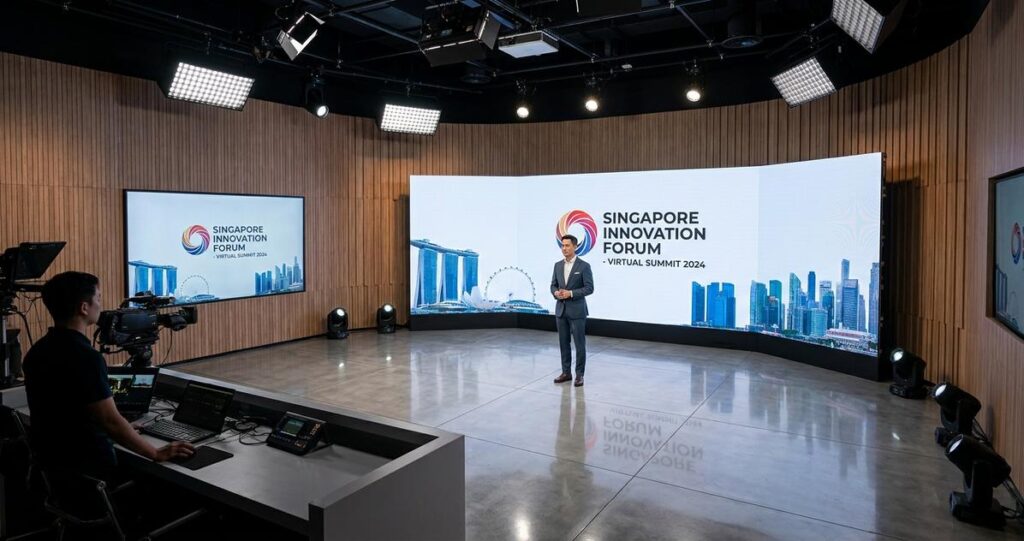
When people watch a branded launch, a town hall, a medical symposium, or a government-style announcement produced in a virtual studio, they often notice the overall polish before they notice any technical details. Yet the smallest visual elements matter more than most viewers realise. Skin textures, fabric weaves, product surfaces, printed labels, reflections, and background materials all affect how credible a virtual set feels. In Singapore, where audiences are highly accustomed to clean corporate presentations, high production standards, and fast digital consumption, these details can shape whether a virtual event feels trustworthy and professional, or flat and artificial.
High-resolution textures are not just about making things look “sharp.” In virtual production, texture refers to the visual surface detail mapped onto digital objects, walls, floors, and props. When those textures are realistic, consistent, and rendered at the right resolution, the entire studio environment feels cohesive. When they are blurry, repetitive, overcompressed, or mismatched, even the best lighting and camera work can struggle to save the image. For Singapore businesses using virtual studios for hybrid events, investor briefings, product launches, training sessions, or livestreamed conferences, this is not a cosmetic issue. It affects audience trust, brand perception, and how smoothly a message is delivered.
What high-resolution textures actually do in a virtual studio
In a virtual studio, a texture is the image or pattern applied to a 3D surface. Think of it as the skin of the digital set. A texture can show the grain of a tabletop, the brushed finish of metal, the stitching on a chair, or the subtle surface variation of a wall panel. High-resolution textures contain more visual information, which allows the surface to remain detailed when viewed up close, on large screens, or through cameras that capture fine image data.
This matters because virtual studios are usually viewed in motion. Camera pans, presenter movement, and switching between wide and close shots can expose flaws very quickly. If the texture resolution is too low, the audience may see softness, pixelation, stretching, or visible repetition. In contrast, high-resolution textures help preserve the illusion that the digital set is physically present in the room. That illusion is central to virtual production, especially when the presenter is standing next to a screen, desk, or product model that should look real enough to support the message.
How texture resolution affects realism
Resolution alone does not guarantee realism, but it sets the baseline. A high-resolution texture gives artists more room to preserve subtle details such as surface irregularities, shadows in material folds, and small printed features. This is particularly important in close-up shots or when the camera uses shallow depth of field, because the audience’s attention naturally shifts to the areas with the most visible detail.
When the texture is too low-resolution, the human eye quickly detects the mismatch between the digital object and the rest of the studio. Even viewers who cannot identify the technical cause may still feel that something looks “off.” That reaction reduces confidence in the production. For brands in Singapore, where presentation standards are often closely linked with credibility, these small visual weaknesses can undermine a carefully planned event.
Why compression and scaling can damage quality
High-resolution textures can still look poor if they are compressed too aggressively or scaled without care. Compression removes data to reduce file size, which can introduce visible artifacts such as blockiness, banding, or loss of fine detail. Scaling can also blur a texture if it is stretched beyond its intended size. A small logo texture, for example, may look acceptable on a monitor but become visibly soft when applied to a large virtual wall.
In practice, the production team has to balance quality and performance. Very large texture files can place unnecessary load on the rendering pipeline, especially in live production where stability matters. The goal is not to use the largest possible file, but to use the right resolution, mapped correctly, with clean optimisation so the studio looks good without slowing down playback or increasing the chance of glitches.
Why this matters so much for Singapore audiences and events
Singapore’s event landscape is highly competitive and efficiency-driven. Organisations often expect clean visuals, reliable delivery, and a clear return on investment for every presentation. That applies whether the event is a corporate town hall in the central business district, a professional conference at a convention venue, or a livestreamed product announcement reaching regional viewers across Southeast Asia. High-resolution textures support this expectation by helping virtual sets look deliberate, polished, and aligned with the brand.
There is also a practical local factor. Many Singapore events are hybrid. That means the audience may include both in-room attendees and remote viewers on laptops, tablets, or mobile phones. Virtual studios have to work across different screens and viewing distances. Fine details that seem invisible on a large backdrop may become important on a high-definition live stream, where camera quality and display clarity can reveal the limits of the asset files used.
For multinational companies based in Singapore, visual consistency is another consideration. A virtual set used for regional briefings should present the same standard to local staff, clients, and partners. High-resolution textures support brand consistency because they help digital environments feel designed, not improvised. That impression matters in settings where professional trust is part of the message.
Brand perception in corporate communication
Corporate audiences often judge content quickly. If a virtual studio appears detailed and stable, the organisation seems prepared and credible. If surfaces appear flat or poorly rendered, some viewers may subconsciously assume the presentation was rushed. This does not mean the audience is being superficial. It simply reflects how people process visual cues. In communication settings, visual quality acts as part of the message itself.
For Singapore-based businesses, this is especially relevant in investor relations, financial services, healthcare communication, education, and B2B product demonstrations, where accuracy and professionalism are closely watched. A textured background that looks realistic can help create the right tone without distracting from the speaker.
Practical viewing conditions in Singapore
Singapore audiences often watch content during work hours, commuting time, or at home on compact devices. That means the production has to remain readable in less-than-ideal conditions. A high-resolution texture preserves definition even when the screen is small or the stream is compressed by the platform. This is helpful for viewers watching on mobile data, older monitors, or conference room displays, all of which are common in real-world business settings.
The technical elements that determine texture quality
Texture quality is shaped by more than resolution. In a well-built virtual studio, several technical choices work together to produce a convincing result. These include the source image quality, UV mapping, normal maps, material properties, and lighting integration. If one part is weak, the rest of the system has to compensate, and that often leads to inconsistent visuals.
UV mapping is the process of projecting a 2D image onto a 3D model. If the mapping is stretched or poorly aligned, even the best texture can look unnatural. Material properties describe how a surface reacts to light. A glossy table, a matte wall, and brushed aluminium all reflect light differently, so the texture and material settings must work together. When they do, the object looks physically believable.
Normal maps and surface depth
Normal maps are textures that simulate small surface bumps and depth without adding more geometry. They are useful because they allow a flat surface to appear more detailed when light falls across it. For example, a wall panel can show grooves or fine patterning, even though the actual 3D model is relatively simple. This helps keep the scene efficient while improving visual richness.
However, normal maps work best when paired with high-quality base textures. If the underlying image is too soft or noisy, the surface can still feel artificial. Strong virtual production depends on the relationship between these layers, not on any single asset alone.
Lighting and texture are inseparable
Lighting determines how texture is perceived. A realistic texture can look flat under poor lighting, while a mediocre texture can look better under well-designed light. In virtual studios, lighting has to be planned with the texture palette in mind. Bright highlights can expose compression artifacts, while soft directional light may reveal surface structure more gracefully. That is why texture design and lighting design should be developed together rather than separately.
This is also relevant for presenters. If the presenter is lit naturally but the virtual set is lit inconsistently, the mismatch becomes obvious. High-resolution textures give the lighting system more believable material to work with, making the whole scene more coherent.
Best practices for creating and using high-resolution textures
Strong texture work starts with planning. The production team should decide where detail is truly needed, where it can be simplified, and how the textures will behave in camera. Not every surface needs the maximum possible resolution. A background wall may need less detail than a product pedestal or a key branded panel that appears in close-up. Good virtual production is about allocating detail where the audience will actually see it.
In Singapore, where event budgets and timelines are often tight, this planning stage is especially important. A team that understands the intended camera shots, presentation format, and viewing platform can create textures that perform well without wasting resources. This makes the final workflow more stable and efficient.
Prioritise assets that appear near the camera
Objects closest to the lens should receive the most attention. These are the surfaces most likely to expose flaws. If a branded product, a host desk, or a presentation panel is featured prominently, its texture should be built at a quality level that supports close viewing. Background elements that remain distant can often use more efficient assets without harming the overall scene.
This approach helps maintain performance while protecting the visual impact of the most important parts of the set. It is a practical way to balance quality and live reliability.
Match texture design to brand identity
Textures should reflect the brand’s visual language. A technology brand may use smooth, modern surfaces with subtle detail. A luxury or design-led company may need richer material cues, such as fine grain, soft reflections, or elegant patterning. A public-facing institution may prefer clean, restrained surfaces that communicate clarity and stability. The texture choices should support the message, not compete with it.
For Singapore organisations, this is especially useful in bilingual or multi-market events where design needs to feel sophisticated but neutral enough for a wide audience. Clear texture direction helps maintain brand consistency across different formats and production teams.
Test on the actual delivery platform
A texture that looks excellent in a studio preview may behave differently once streamed, compressed, or viewed on another screen. That is why testing matters. The production team should check the set on the actual output path, whether that is a livestream platform, a video conferencing tool, or a large venue display. This is the only reliable way to see how the textures survive real-world conditions.
For Singapore events, where audiences may join from office networks, home broadband, or mobile connections, testing on multiple devices is valuable. It helps identify whether the final image remains crisp enough across different viewing conditions.
Common mistakes that reduce the impact of high-resolution textures
Even with good assets, a virtual studio can lose realism if the textures are handled poorly. One common mistake is overusing the same texture across multiple surfaces. Repetition can quickly make a digital environment feel artificial. Another issue is using textures that are too busy, which can distract from the presenter or the content on screen. Detail should support the message, not overpower it.
Another frequent error is ignoring scale. A texture that looks correct on a small model may appear obviously fake when applied to a large object. The relationship between real-world dimensions and texture detail has to be considered from the start. If the scale is wrong, viewers may notice that the pattern repeats too frequently or appears physically impossible.
Overly clean surfaces can also look fake
Real-world materials usually have slight imperfections. Perfectly uniform surfaces can feel synthetic, especially when paired with digital lighting. High-resolution textures work best when they capture subtle variation, such as tiny scratches, grain, or natural irregularity. The goal is not to make a surface look dirty or damaged. The goal is to make it believable enough that the viewer accepts it without distraction.
This principle is especially relevant for corporate virtual studios, where the challenge is often to appear polished without feeling sterile. Subtle realism creates that balance.
What Singapore businesses should ask before choosing a virtual studio
For organisations planning an event, it helps to ask the production team practical questions about texture quality and workflow. What resolution are the key assets built at? How are textures optimised for live performance? Are the most important surfaces designed for close-up shots? How will the studio look on mobile, desktop, and venue displays? These questions are not technical trivia. They directly affect whether the final event will look professional and consistent.
It is also sensible to ask for camera tests or sample renders before the event. A preview can reveal issues with texture scale, aliasing, or compression before they become public problems. In a live environment, prevention is always better than correction.
For Singapore teams managing tight schedules, this early review is especially useful. It reduces the risk of last-minute surprises and supports a smoother event day.
High-resolution textures are one of the quiet foundations of a successful virtual studio. They help the digital environment feel real, keep branding consistent, and support the presenter without drawing attention to the technology behind the scenes. When done well, they give the audience a sense of confidence that the entire production has been thoughtfully built.
For Singapore organisations, the practical lesson is straightforward. If a virtual event is meant to represent your brand, your expertise, or your message, the visual surfaces in that studio deserve the same level of care as the script, the lighting, and the live delivery. Detail is not decoration. In virtual production, detail is part of trust. If you are planning a virtual or hybrid event, work with a production partner that can explain how textures, lighting, and camera design are managed together, so the final experience feels polished, accurate, and ready for a professional audience.
General information only: This article is intended for educational and planning purposes. For advice on a specific production setup, platform, or technical workflow, consult an experienced virtual production team.

Jeremy Lee is a seasoned digital marketing director and strategist with over two decades of experience in the industry. As the founder of Sotavento Medios, I manage a diverse portfolio of over 50 businesses, helping brands grow through advanced search strategies and digital innovation. My work focuses on bridging the gap between traditional search engine optimisation and the evolving world of AI-driven answer engines.
get in touch