
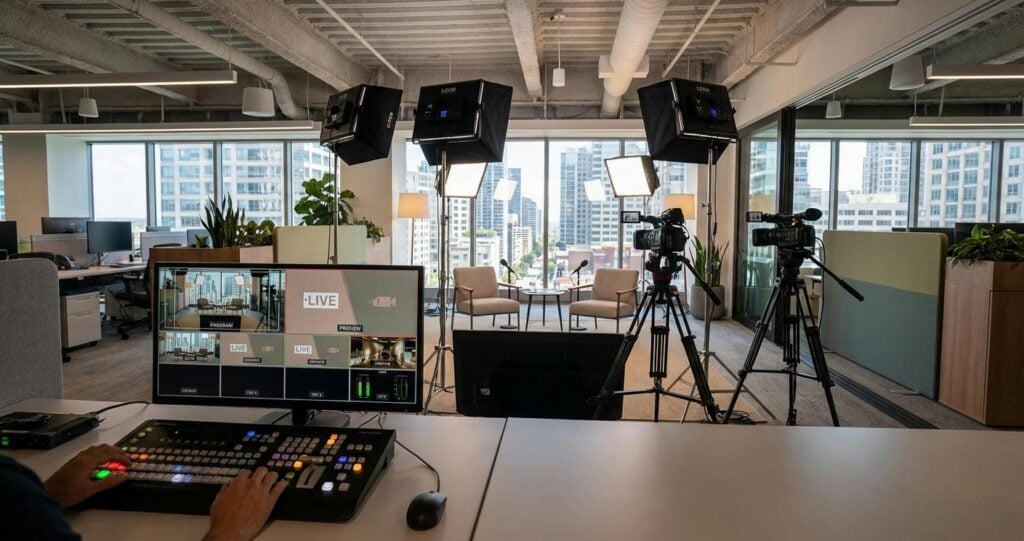
Transforming Corporate Spaces: The Technical Blueprint for a Temporary Broadcast Studio
The demand for broadcast-quality video production within the enterprise environment has accelerated. C-suite town halls, global sales kick-offs, and critical stakeholder briefings can no longer be serviced by consumer-grade webcam solutions. The challenge for IT directors, production managers, and event planners is converting a standard office space, such as a large conference room or an open-plan area, into a temporary, technically proficient broadcast studio. This transformation is not merely about setting up a camera and a microphone; it requires a meticulous approach to network infrastructure, power management, signal integrity, and production workflow to achieve the reliability and quality expected in B2B communications. Success hinges on a deep understanding of broadcast engineering principles applied within the constraints of a corporate environment. This guide provides a technical deep-dive into the critical logistics, moving beyond basic setups to detail the enterprise-grade infrastructure required for flawless hybrid and virtual event execution.
Foundational Infrastructure: Network and Power Prerequisites
Before a single piece of production hardware is unboxed, the underlying network and power infrastructure must be rigorously assessed and provisioned. These invisible foundations are the most common points of failure in temporary B2B streaming setups. Overlooking them guarantees signal degradation, connection drops, and catastrophic broadcast failure. A professional approach treats the temporary studio as a mission-critical data center, demanding dedicated, uncontended resources.
Network Architecture and Bandwidth Allocation
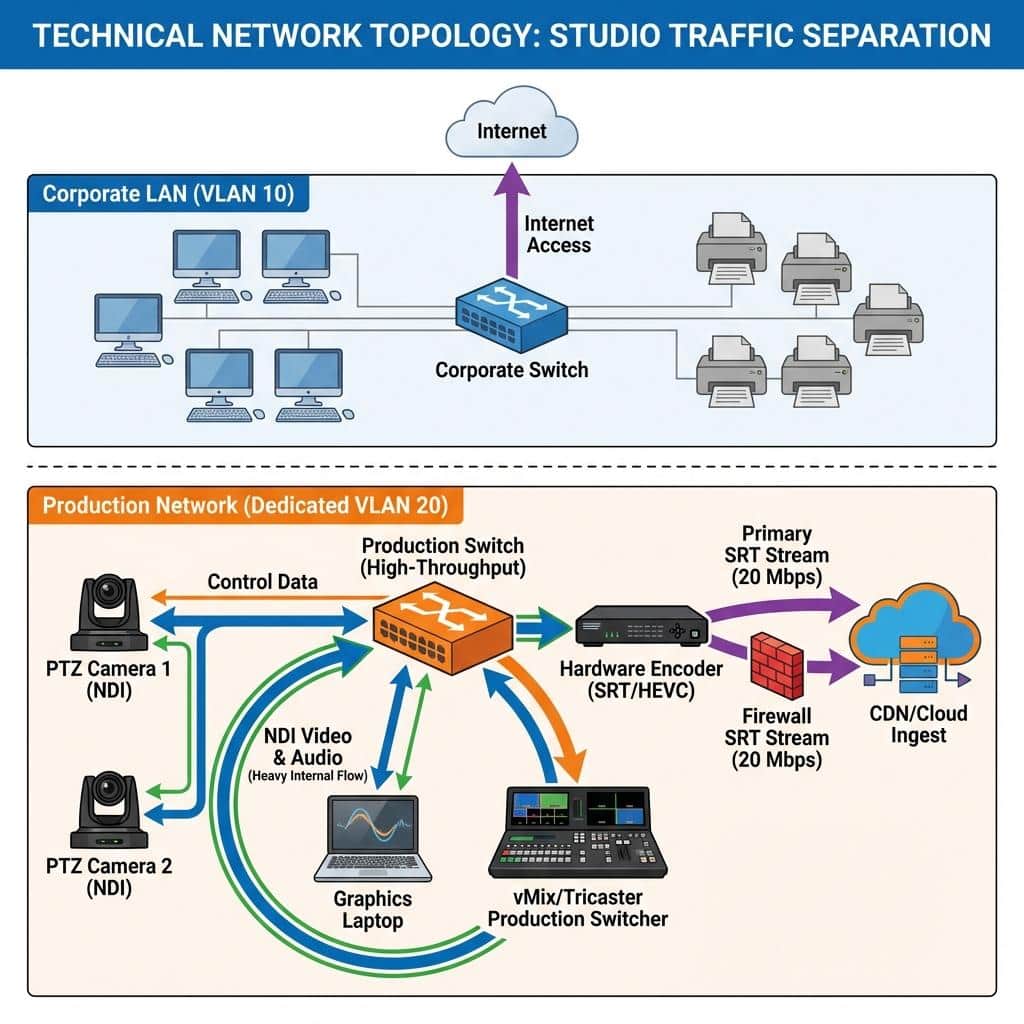
The corporate local area network (LAN) is a shared resource, and broadcast video traffic cannot compete with daily email, file transfers, and general web browsing. The first and most critical step is to coordinate with the IT department to provision a dedicated Virtual LAN (VLAN). This logically isolates all production traffic, including camera feeds, audio signals, and control data, from the general corporate network, preventing packet loss and jitter caused by resource contention. For production workflows utilizing Network Device Interface (NDI), a protocol for sending high-quality, low-latency video over Gigabit Ethernet, this isolation is non-negotiable. Full-bandwidth NDI can consume upwards of 125 Mbps per 1080p60 video stream, requiring a dedicated, high-performance network fabric. Even for compressed NDI|HX, each stream requires a stable 8-20 Mbps.
For external transmission, bandwidth allocation is paramount. While the legacy Real-Time Messaging Protocol (RTMP) can function on 10-15 Mbps for a 1080p stream, modern B2B productions should standardize on Secure Reliable Transport (SRT). SRT is a UDP-based protocol that provides superior error correction and performance over unpredictable public networks. A primary 1080p60 SRT stream should be allocated a minimum of 20-25 Mbps of uncontended upload bandwidth. For full redundancy, a secondary, geographically diverse internet connection is recommended. This allows for seamless failover at the encoder or cloud platform level. We recommend implementing Quality of Service (QoS) policies on the network switch ports dedicated to the broadcast VLAN, prioritizing SRT and NDI packet types to ensure they are serviced before any other traffic.
Power Distribution and Redundancy
Professional production equipment has significant power requirements that can easily overwhelm a standard office circuit. A typical setup including three broadcast cameras, a video switcher, multiple monitors, an audio mixer, and LED lighting panels can draw over 3000 watts. Relying on a single 15-amp office circuit is a recipe for disaster. The initial site survey must identify the location of electrical breaker panels to run dedicated, high-amperage circuits (known as ‘distro’) directly to the production area. All equipment power loads must be calculated and distributed across separate circuits to prevent overloads. For example, all lighting should be on one or more dedicated circuits, separate from the sensitive video and audio hardware. Furthermore, every critical component in the signal chain, including the primary switcher, encoder, and core network switch, must be connected to an uninterruptible power supply (UPS). This provides battery backup during momentary power fluctuations or outages, preventing a complete system restart and loss of broadcast.
Core Production Hardware: Signal Flow and Processing
With a robust network and power foundation, the focus shifts to the tangible production hardware. The selection and integration of cameras, switchers, and audio equipment define the production’s capabilities and quality. The goal is to create a cohesive signal flow, from image and sound capture to final processing and encoding, with professional monitoring and control at every stage.
Camera and Ingest Systems
The choice between camera systems depends on the production’s scale and staffing. For dynamic events, professional broadcast cameras with interchangeable lenses and Serial Digital Interface (SDI) outputs offer the highest fidelity and control. SDI is a coaxial-based cabling standard (defined by SMPTE) that provides a robust, uncompressed, and low-latency connection ideal for mission-critical video. For smaller footprints or remote operation, Pan-Tilt-Zoom (PTZ) cameras offer immense flexibility. Modern PTZ cameras can output signals via SDI, HDMI, or directly as NDI streams over the network. When using NDI, cameras can be powered, controlled, and transmit video/audio over a single Ethernet cable using Power over Ethernet (PoE+), dramatically simplifying cabling. Regardless of the camera type, all sources must be genlocked or frame-synced at the video switcher to ensure clean, glitch-free switching between inputs.
Video Switching and Routing
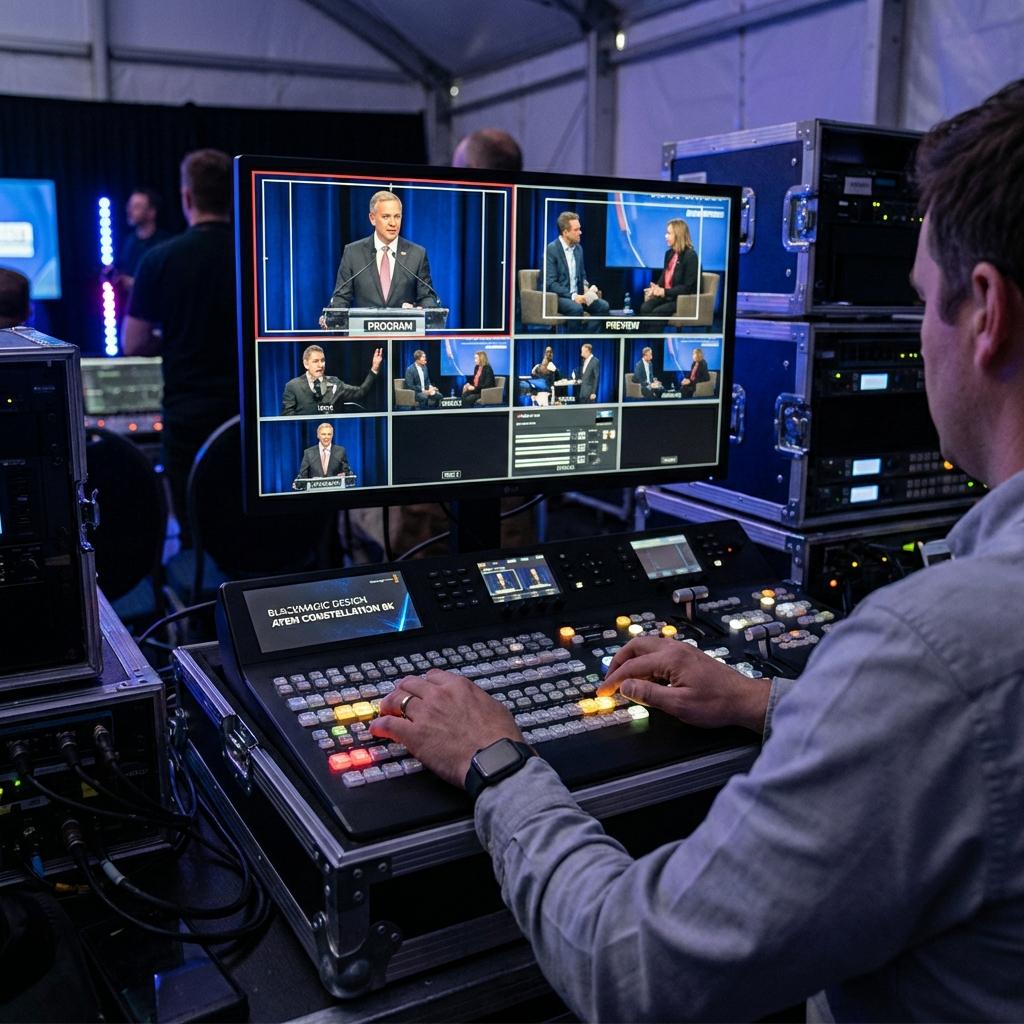
The video production switcher is the heart of the temporary studio. This device, which can be a hardware panel like a Blackmagic ATEM Constellation or a software solution like vMix or Tricaster, allows a director to switch between camera angles, roll pre-recorded video packages, add graphics, and create composite shots. A professional workflow requires a switcher with a multiview output, displaying all sources, a preview bus (what’s cued up next), and a program bus (what is currently live) on a single monitor. This is essential for precise, broadcast-style direction. Signal routing is managed either physically via an SDI patch bay for larger setups or digitally within the switcher or an NDI routing application. ISO (isolated) recording of each camera feed directly from the switcher or an external recorder is a critical best practice, providing clean source footage for post-event editing and archival.
Audio Chain: From Capture to Mix-Minus
Audio is arguably more critical than video in a corporate broadcast. Poor audio quality immediately signals an amateur production. The audio chain begins with professional microphones, typically wireless lavalier microphones for presenters and shotgun microphones on boom poles for panel discussions. These signals are fed into a digital audio mixer. Here, a trained audio engineer performs gain staging, applies equalization (EQ) and compression, and builds the main program mix. For hybrid events with remote contributors via platforms like Teams or Zoom, a mix-minus feed is essential. This is a custom audio output sent back to the remote participants that contains the full program audio minus their own microphone signal, which prevents them from hearing a delayed echo of their own voice.
Encoding, Transmission, and Content Delivery
The final stage in the temporary studio workflow is the encoding and transmission of the final program feed to the audience. This is where the polished production is compressed and packaged for delivery over the internet to a Content Delivery Network (CDN) or enterprise streaming platform.
Encoding Hardware vs. Software Solutions
The program output from the video switcher must be encoded from its baseband SDI or NDI format into a compressed format suitable for streaming, typically using the H.264 or the more efficient H.265 (HEVC) codec. This can be accomplished with a dedicated hardware encoder or a software encoder. Hardware encoders (from brands like Haivision, AJA, or Teradek) are purpose-built appliances that offer high reliability and stable performance, making them ideal for mission-critical broadcasts. Software encoders, often integrated into production software like vMix, offer more flexibility for graphics and processing but rely on the host computer’s CPU/GPU resources. For enterprise-level events, a dedicated hardware encoder is the recommended primary solution, potentially with a software encoder running in parallel as a backup.
Protocol Selection for Reliable Contribution
As mentioned, SRT is the industry standard for contribution feeds from a temporary studio to the cloud. Its ability to negotiate and recover from packet loss makes it far superior to RTMP for delivery over the public internet. A typical configuration involves sending two identical SRT streams from the on-site encoder to two separate ingest points at a cloud streaming platform or CDN. This bonded or redundant stream setup provides seamless protection against network provider issues. The encoder should be configured for a Constant Bitrate (CBR) to ensure a smooth and predictable data flow that is easily handled by downstream network infrastructure and distribution platforms.
Integration with Enterprise Platforms and CDNs
The destination for the SRT feed depends on the audience. For large-scale external events, the feed is sent to a professional CDN (like Akamai or Cloudflare) which then handles global distribution. For internal corporate events, the stream can be integrated into enterprise platforms. Microsoft Teams, for example, allows for external hardware encoder integration via its ‘Producer’ role in Live Events, ingesting an RTMP or RTMPS feed. Similarly, platforms like Zoom Events and Webex can be configured to use a professional production feed from an external switcher and encoder, bypassing the platform’s standard webcam interface to deliver a high-quality, multi-camera broadcast to employees and stakeholders within a familiar corporate environment.
Environmental and Acoustic Considerations
The final layer of logistical planning involves taming the office environment itself. A standard conference room is acoustically and visually hostile to broadcast production, filled with hard, reflective surfaces and lit by unflattering fluorescent overheads.
Acoustic Treatment for Corporate Spaces
Glass walls, large tables, and hardwood floors create significant audio reverberation and echo. While permanent acoustic treatment isn’t feasible, temporary solutions are highly effective. Heavy-duty acoustic blankets can be hung on portable stands to dampen reflections and create a sonically ‘dead’ space around the presenters. Portable bass traps can be placed in corners to absorb low-frequency buildup. It is critical to identify and disable or mitigate sources of ambient noise, such as HVAC systems, server fans, or nearby office activity, to achieve a clean audio recording.
Lighting Design for a Professional Look
Office lighting is designed for task visibility, not cinematic quality. It is often harsh, creates unflattering shadows, and has an inconsistent color temperature. A professional lighting setup, based on the three-point lighting principle (Key, Fill, and Back light), is required. Modern LED soft panels are ideal for temporary studios as they are lightweight, have low power draw, and offer adjustable color temperature (measured in Kelvin) and brightness. This allows the lighting director to create a soft, even light that schmeichelt the subject, separates them from the background, and matches the color temperature of all cameras for a consistent and professional image.

Jeremy Lee is a seasoned digital marketing director and strategist with over two decades of experience in the industry. As the founder of Sotavento Medios, I manage a diverse portfolio of over 50 businesses, helping brands grow through advanced search strategies and digital innovation. My work focuses on bridging the gap between traditional search engine optimisation and the evolving world of AI-driven answer engines.
get in touch