
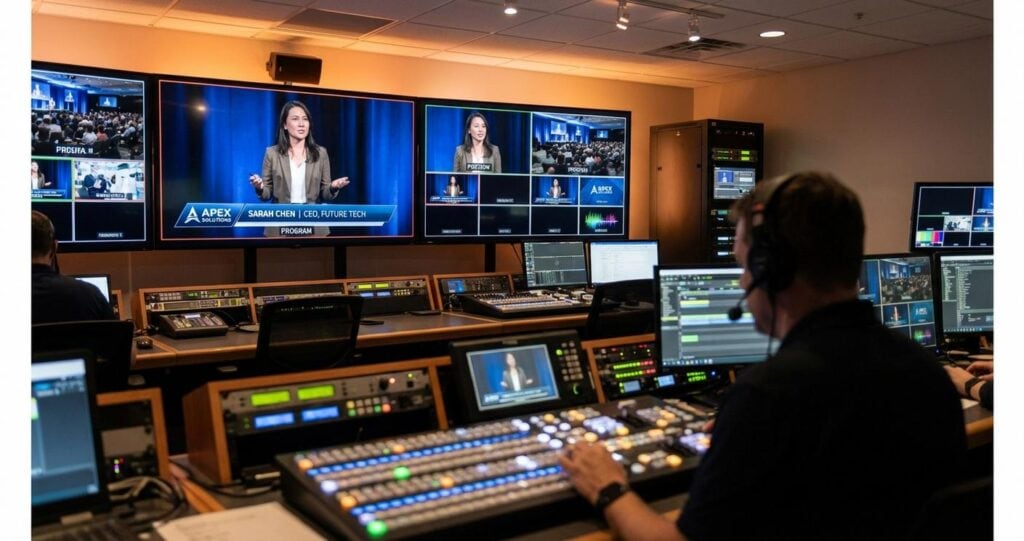
The Technical Architecture of Professional On-Screen Branding
In the domain of B2B event streaming and hybrid productions, on-screen graphics are not merely decorative elements; they are a critical component of the broadcast infrastructure, essential for maintaining corporate brand integrity and conveying complex information with clarity. For enterprise clients, the seamless integration of custom, data-driven graphics is a non-negotiable aspect of a professional presentation. This requires a robust technical workflow that extends far beyond simple logo placement. It involves a sophisticated understanding of video signal flow, real-time data integration, production automation, and the specific encoding requirements for pristine delivery to a discerning professional audience. This article provides a detailed technical analysis of the systems and protocols required to execute a flawless custom graphics package in a professional live stream, focusing on the enterprise-grade solutions that separate consumer-level streaming from broadcast-quality corporate communication.
The challenges are significant. A hybrid event may require simultaneous delivery of graphics to in-venue LED displays, the main program feed for a global remote audience, and specific outputs for presenter confidence monitors. Each destination may have unique resolution, aspect ratio, and data requirements. Maintaining perfect synchronization, brand color accuracy across different color spaces like Rec. 709, and real-time responsiveness for interactive elements like Q&A sessions demands a production architecture built on precision and reliability. We will explore the foundational technologies, from SDI and NDI signal routing to the advanced capabilities of dedicated character generators and the protocols that enable dynamic, data-driven content in real time.
Establishing a Resilient Graphics Signal Flow Architecture
The foundation of any professional graphics package is its integration into the core video production system. This integration is managed through a carefully designed signal flow that ensures the highest possible quality and control. The method of transport, keying process, and choice of generation hardware are primary architectural decisions.
Signal Transport: Baseband SDI vs. IP-Based NDI
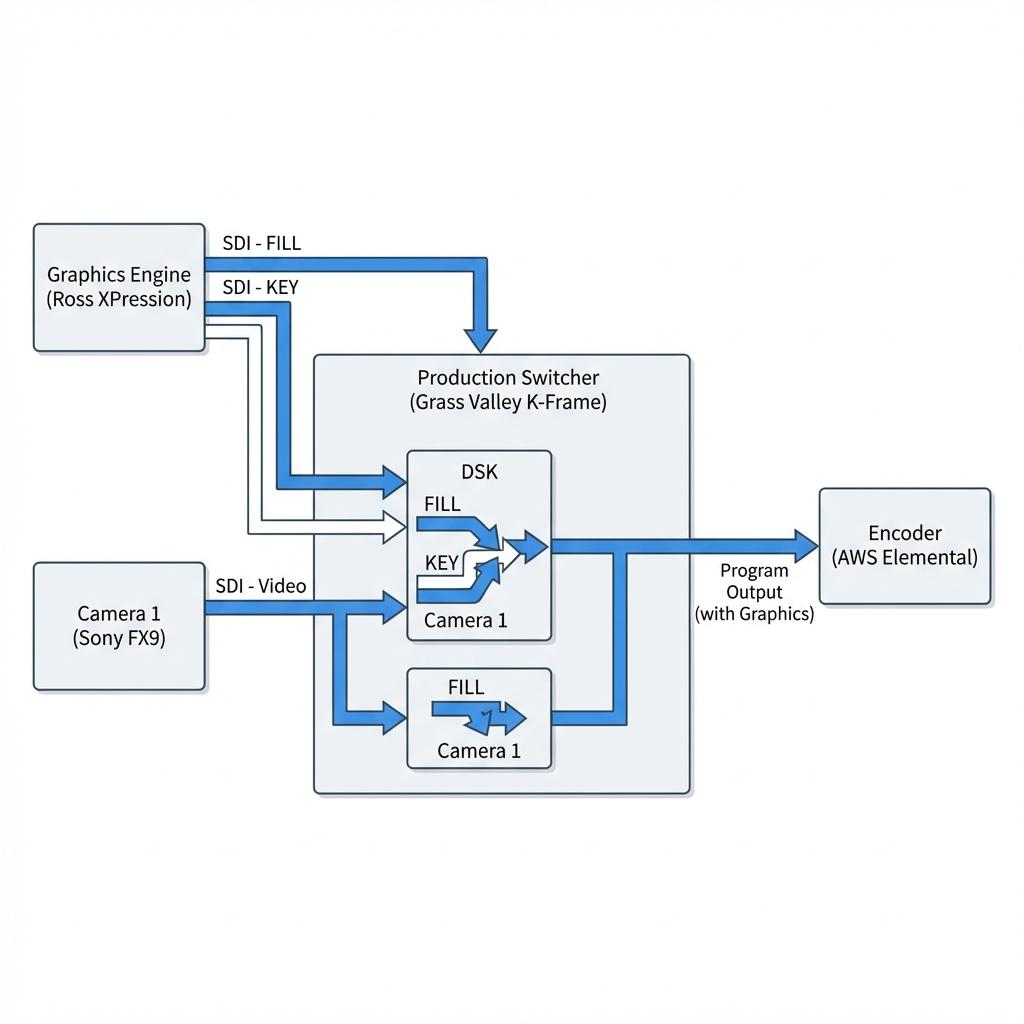
The transport of graphics from the generation source to the production switcher is a critical first step. For decades, the industry standard has been baseband video over Serial Digital Interface (SDI), a robust one-way protocol for transmitting uncompressed, low-latency video. In a typical graphics workflow, two SDI signals are used: a Fill signal containing the full-color graphic, and a Key signal, which is a grayscale matte representing the alpha channel or transparency information. Standards like 3G-SDI (for 1080p60) and 12G-SDI (for 2160p60) provide the necessary bandwidth. This dual-cable method allows a production switcher to perform downstream or upstream keying, precisely layering the graphic over other video sources. However, the emergence of IP-based workflows has introduced Network Device Interface (NDI), a protocol developed by NewTek. NDI allows for the transmission of video, audio, metadata, and alpha channel information over a standard Gigabit Ethernet network. A key advantage of NDI is its ability to carry the Fill and Key information within a single network stream, simplifying cabling and infrastructure, especially in large or distributed production environments. The choice between SDI and NDI often depends on existing infrastructure, latency requirements, and the scale of the production. While SDI offers near-zero latency and proven reliability, NDI provides immense flexibility and scalability, though it requires meticulous network configuration and management to ensure Quality of Service (QoS).
Graphics Generation: Dedicated Hardware vs. Integrated Software
The tool used to create and play out graphics is the engine of the entire system. At the highest level of production, dedicated hardware Character Generators (CGs) such as the Ross XPression or Chyron Lyric are the standard. These are purpose-built broadcast machines with powerful real-time 3D rendering engines, optimized for instant recall and playout of complex animated graphics. They offer redundant power supplies, failover mechanisms, and deep integration with production automation systems. For most enterprise events, software-based solutions running on high-performance workstations offer a powerful and flexible alternative. Solutions like vMix’s GT Designer, NewBlueFX Titler Live, and Singular.live (a cloud-based HTML5 platform) provide extensive capabilities. These systems leverage modern GPU acceleration for rendering and can often be integrated directly into a software-based switcher like vMix or Tricaster, or output via SDI or NDI to a hardware switcher. The primary consideration when specifying a software solution is ensuring the host computer has sufficient processing power, GPU capability, and I/O for the required number of graphics layers and output resolution without dropping frames.
Asset Management and Pre-Production Standards
A successful live graphics execution begins in pre-production. All graphical assets, including logos, background plates, and animations, must be prepared to exact technical specifications. For full-screen animations or lower-thirds with alpha transparency, codecs like Apple ProRes 4444 or Avid DNxHD with alpha channels are standard. Vector graphics (SVG, EPS) are preferred for logos and static elements as they can be scaled to any resolution without loss of quality, while raster images (PNG, TIFF) must be created at or above the target production resolution (e.g., 1920×1080 for HD, 3840×2160 for UHD). A critical and often overlooked detail is color space consistency. All assets should be created in the target color space of the production, typically ITU-R BT.709 for HD broadcast, to ensure that corporate brand colors are rendered accurately in the final program feed.
Integrating Dynamic Data for Real-Time Content Delivery
The true power of a professional graphics system lies in its ability to display dynamic, real-time information. This elevates a live stream from a simple presentation to an interactive and engaging experience. This requires a workflow that connects the graphics engine to external data sources via APIs and control protocols.
Data-Driven Graphics via APIs and External Sources
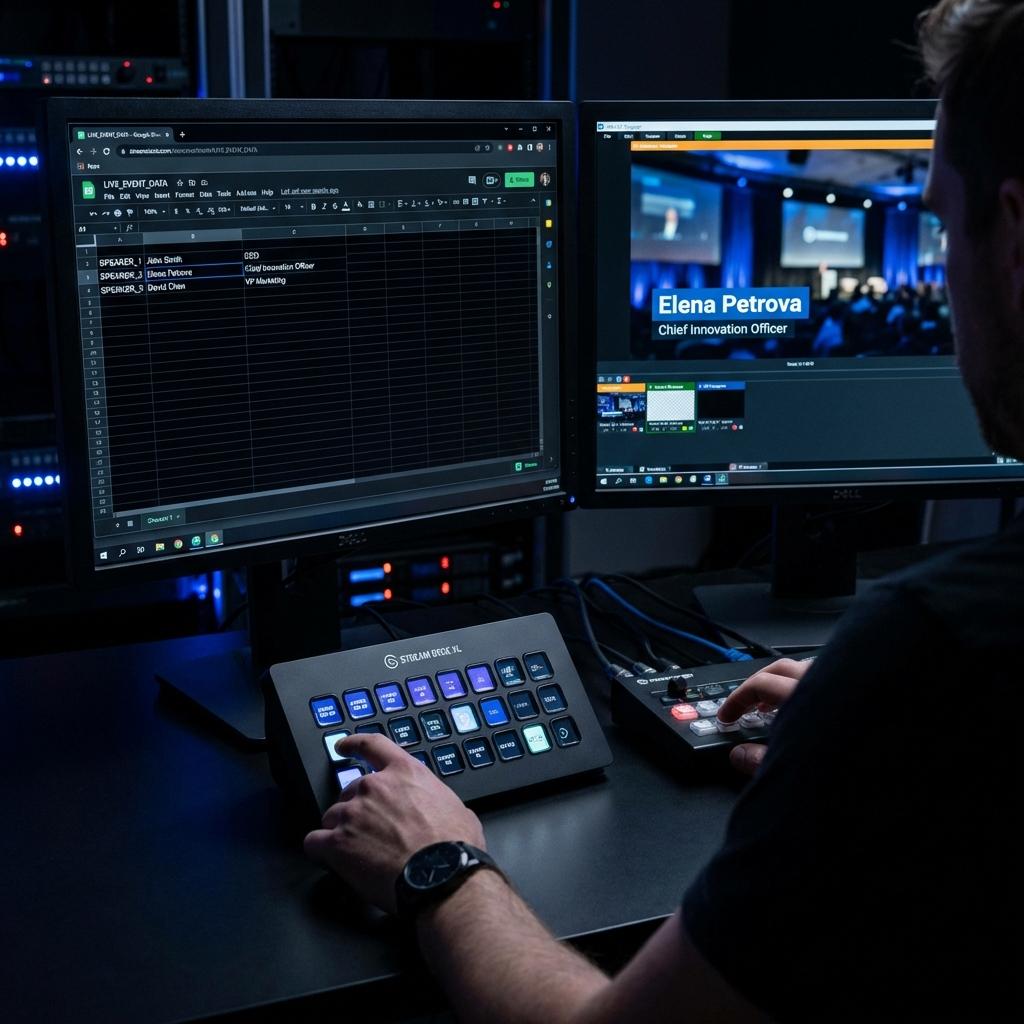
Modern graphics platforms are designed to parse data from various sources and map it to fields within a graphics template. For example, a lower-third template for a speaker will have text fields for ‘Name’ and ‘Title’. Instead of an operator manually typing this information for every speaker, the graphics system can be linked to a central data source. This could be a Google Sheet, an XML file, a JSON feed from a web API, or a direct database connection. During a corporate town hall, a live Q&A session moderated on a platform like Slido can have its approved questions fed directly into a graphics template via an API. The graphics operator simply selects the question to display, and it is populated on-screen instantly and accurately. This workflow minimizes the risk of human error (e.g., typos), accelerates the display of timely information, and allows for complex data visualization, such as live polling results, to be rendered professionally on the fly.
Automation and Control Protocols for Operational Efficiency
In a high-pressure live environment, simplifying the operator’s job is paramount. Production automation systems and control protocols allow complex graphic sequences to be triggered by a single button press. Tools like Bitfocus Companion, running on a computer and paired with a physical Elgato Stream Deck, provide a powerful tactile interface for the graphics operator or Technical Director. A single button on the Stream Deck can be programmed to execute a series of commands over the network via TCP or UDP. For instance, a ‘Show Speaker 1’ button could simultaneously send commands to the graphics engine to play the speaker’s lower-third animation, instruct the video switcher to cut to the speaker’s camera, and tell the audio mixer to unmute their microphone channel. This level of integration, often utilizing manufacturer-specific APIs or general-purpose protocols like Open Sound Control (OSC), ensures tight synchronization between all production elements and creates a polished, broadcast-quality result.
Advanced Graphics for Hybrid and Enterprise Environments
Hybrid events, which cater to both in-person and remote audiences, introduce another layer of complexity to graphics management. Furthermore, distributing this content through enterprise platforms requires a specific set of technical considerations to maintain quality and control.
Synchronizing On-Premise and Broadcast Graphics
In a hybrid event setting, the graphics must serve two masters: the physical stage and the virtual stream. An LED wall behind the presenter might require an ultra-widescreen resolution, while the broadcast feed is a standard 16:9. A professional graphics system must be capable of driving multiple outputs simultaneously, each with custom resolutions and layouts from a single set of templates and data. This is achieved using multi-channel CGs or software that can manage multiple “canvases”. To ensure all video elements are perfectly synchronized, the entire system, including cameras, switcher, and graphics engine, must be locked to a common reference signal, a process known as Genlock. This prevents timing artifacts like frame tearing or jitter, which are unacceptable in a professional production.
Program Feed Integration with Enterprise Platforms
Corporate events are often streamed through enterprise communication platforms like Microsoft Teams, Zoom Events, or Webex. These platforms have limited native graphics capabilities. Therefore, the entire production, including all camera switching, audio mixing, and custom graphics, must be produced externally and sent to the platform as a single, finished Program feed. This is accomplished by taking the main Program output from the production switcher and feeding it into an encoder. The encoder then sends the stream to the platform using a protocol like RTMP (Real-Time Messaging Protocol) or, preferably, SRT (Secure Reliable Transport) for its superior reliability and lower latency over public networks. For platforms that support a “production” mode, such as Microsoft Teams using an NDI input, the Program feed can be sent directly into the meeting as a high-quality video source, allowing the professionally produced content to replace a standard webcam feed.
Optimizing Graphics for Encoding and Final Distribution
The final stage of the graphics workflow is ensuring that the beautifully rendered visuals are not degraded by the compression and distribution process. This requires careful management of encoding settings and an understanding of the entire delivery chain.
Encoding Parameters for High-Frequency Detail
Crisp text and sharp graphic edges contain high-frequency detail that can be challenging for video encoders to handle, especially at lower bitrates. Complex, fast-moving animations can cause temporary macroblocking or artifacting if the encoder is not configured properly. When setting up the streaming encoder, whether it is a hardware appliance like an AWS Elemental Link or a software solution, it is crucial to use a high-quality encoding profile. Using the H.264 (AVC) codec, a variable bitrate (VBR) with a sufficiently high peak is often preferred to handle moments of high graphical complexity. The H.265 (HEVC) codec offers superior efficiency, delivering higher quality at a lower bitrate, but requires compatible playback devices. A production stream for a corporate event should be encoded at a minimum of 6-8 Mbps for 1080p30, with the bitrate increasing for higher frame rates or resolutions to ensure that all on-screen graphics remain sharp and legible for the end-user.
Ultimately, custom graphics in a B2B live stream are a direct reflection of the client’s brand. Executing them flawlessly requires a deep technical expertise that spans the entire production chain, from asset creation and signal flow to data integration and final delivery. It is an infrastructure investment that pays dividends in audience engagement, information clarity, and the professional perception of the brand. At Spring Forest Studio, our technical teams specialize in designing and implementing these sophisticated, broadcast-grade graphics workflows, ensuring that every on-screen element is delivered with precision and impact for our enterprise clients.

Jeremy Lee is a seasoned digital marketing director and strategist with over two decades of experience in the industry. As the founder of Sotavento Medios, I manage a diverse portfolio of over 50 businesses, helping brands grow through advanced search strategies and digital innovation. My work focuses on bridging the gap between traditional search engine optimisation and the evolving world of AI-driven answer engines.
get in touch