
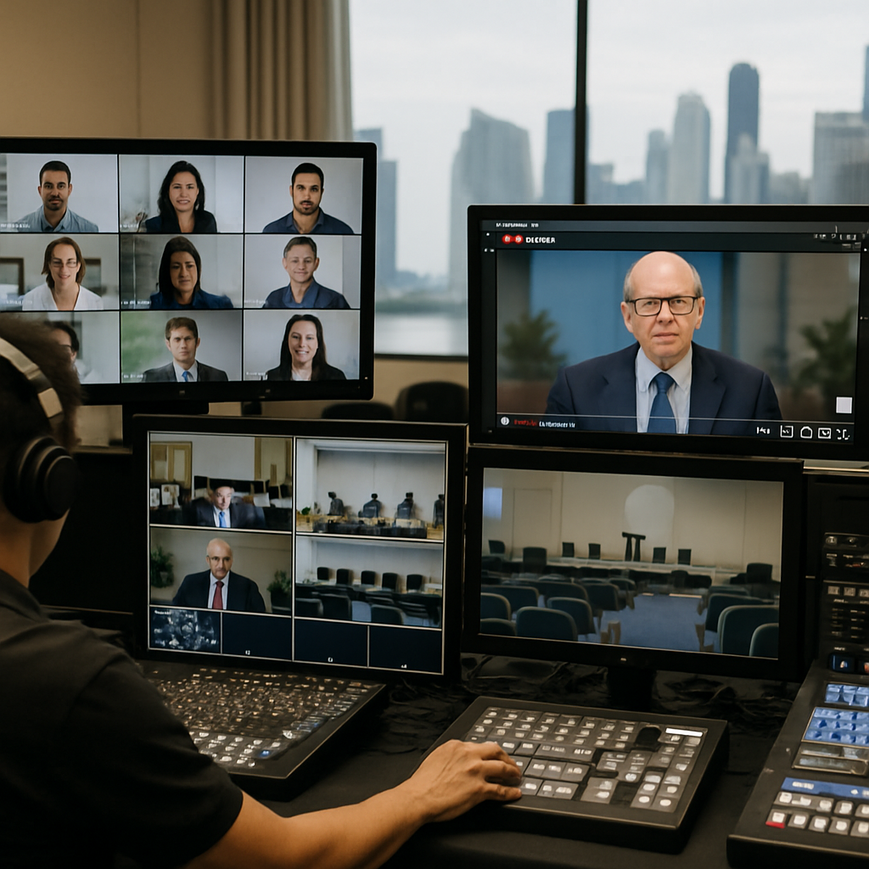
For many organisations in Singapore, live streaming is no longer a niche technical add-on. It is now part of how companies run town halls, product launches, investor briefings, training sessions, public talks, and hybrid events that need to reach both in-room and remote audiences at the same time. Broadcasting to Zoom and YouTube in one event can be highly effective, but it also creates a practical challenge: each platform serves a different viewing purpose, has different audience expectations, and requires careful planning so the stream stays stable, clear, and professional.
When managed well, multi-platform streaming gives you the flexibility to engage participants on Zoom while extending reach through YouTube. For Singapore-based organisations, that matters because teams, clients, partners, and stakeholders may be spread across offices, homes, and regional markets. A board update might need secure interaction on Zoom, while a public keynote may need broad visibility on YouTube. The main concern is not just whether the stream goes live, but whether the experience feels reliable, understandable, and polished on both platforms without technical strain or audio-visual compromise.
The key to success is treating multi-platform streaming as a production workflow, not simply duplicating a video feed. That means understanding the purpose of each platform, designing the signal path correctly, preparing redundant systems, and testing the entire delivery chain before going live. In Singapore’s high-expectation business environment, this level of planning helps organisations protect their brand reputation, reduce technical disruptions, and deliver a smoother audience experience.
Why broadcasting to Zoom and YouTube requires different planning
Zoom and YouTube may both carry live video, but they are fundamentally different environments. Zoom is an interactive meeting platform designed for two-way communication, with features such as gallery view, screen sharing, host controls, and audience participation through chat, Q and A, or audio depending on settings. YouTube is primarily a broadcast platform built for one-to-many delivery, discoverability, and scalable public viewing. Because the platforms are designed for different uses, the production approach should not be identical.
One common mistake is assuming a single stream can be sent to both platforms without adapting framing, audio mix, or moderation needs. In practice, Zoom viewers may need a cleaner presentation style with clear slides, speaker visibility, and controlled interaction. YouTube viewers may benefit from a more polished broadcast look, stronger title graphics, and moderated live chat. If the event is a hybrid conference in Singapore, for example at Marina Bay, Suntec, or a corporate office in the CBD, the production team must consider both the live room audience and the remote audience simultaneously.
Audience expectation differs by platform
People joining Zoom often expect participation. They may be employees, invited guests, training attendees, or closed-group stakeholders. They want to ask questions, speak to the host, and feel part of the meeting. YouTube viewers usually expect a smoother, more passive viewing experience, especially for public events. They may tolerate fewer interruptions but expect consistent audio, steady visuals, and reliable playback.
That difference affects everything from camera choices to moderation workflow. A stream that feels too informal on YouTube may appear unprofessional. A stream that is too broadcast-heavy on Zoom may feel distant and less engaging. The most effective multi-platform production balances both needs by building one core programme feed and adapting the presentation layers for each destination where necessary.
Core technical setup for stable multi-platform delivery
A dependable multi-platform stream starts with a strong signal chain. The camera, microphones, capture hardware, encoder, internet connection, and streaming workflow all need to work together. For Singapore events, where venue internet quality can vary widely between hotels, offices, studios, and convention halls, testing connectivity early is essential. Even a well-produced event can fail if upstream bandwidth is unstable or if the encoding settings are too aggressive for the available connection.
At a minimum, the production team should identify whether the stream will be produced from a single computer, a dedicated hardware encoder, or a software-based live production environment. Each option has trade-offs. A computer-based setup offers flexibility and is common for smaller webinars, but it places more pressure on system resources. A hardware encoder can improve stability for longer events, while a software production tool can be better when you need multiple scenes, overlays, guest routing, and advanced switching.
Video signal quality and framing
Video quality begins with the camera position and composition. Framing should be clean, with the speaker positioned to allow readable facial expressions and enough headroom. If slides are part of the event, the production team should ensure text remains legible after compression. This is especially important on YouTube, where viewers may watch on phones, laptops, or large screens. In Zoom, poor framing can become more distracting because faces, slides, and shared screens often appear in smaller windows.
Lighting should be even and consistent. Backlit speakers, shadows across the face, or overly bright presentation screens can reduce clarity. The goal is not cinematic perfection, but dependable visibility. A professional setup in Singapore often combines a primary camera for the speaker, a second camera for audience shots or alternate angles, and a dedicated feed for presentation content.
Audio is more important than video
For live streaming, audio quality matters even more than image quality because viewers will leave quickly if speech is difficult to hear. Use proper microphones, such as lavalier, handheld, boundary, or headset microphones depending on the event format. Avoid relying on built-in laptop microphones for anything beyond basic internal meetings. Echo, room noise, and inconsistent levels can be especially problematic in hybrid venues where audience reactions, air-conditioning, and room reverberation affect clarity.
Audio should be mixed carefully before it is sent to both Zoom and YouTube. That means checking speaker volume, music playback, video playback audio, and any remote guest audio. It also means avoiding sudden changes in gain that may cause clipping, which is distortion from overly loud sound. A clean audio mix improves comprehension and reduces fatigue for viewers, especially for longer corporate sessions.
Designing the workflow for Zoom and YouTube at the same time
Running a broadcast to two platforms is less about duplicating buttons and more about managing a production workflow. The team must decide whether to send one programme feed to both platforms or use separate outputs. In many cases, a single mastered feed is efficient, but the content still needs to be reviewed for platform-specific needs. This may include different opening slates, different moderation teams, or slightly different settings for privacy and audience participation.
For private corporate meetings or internal training sessions, Zoom may act as the primary interaction layer, while YouTube serves as a public or archived stream. In such cases, access control becomes a serious planning consideration. Some organisations choose unlisted YouTube streams for easier sharing without fully public distribution, while Zoom retains the controlled meeting environment. The right choice depends on the event’s confidentiality, audience size, and communication goals.
Encoding and bitrate management
Encoding means converting audio and video into a format that can be transmitted over the internet. Bitrate is the amount of data used per second, and it affects stream quality and bandwidth usage. Higher bitrate can improve image detail, but if the connection cannot support it, the stream may become unstable. Lower bitrate may reduce quality, but it can be safer for delivery. The best setting depends on the stream resolution, frame rate, movement in the video, and the available upload bandwidth at the venue.
For Singapore venues, upload bandwidth should be checked in advance and tested under realistic conditions. It is not enough to know that the venue has internet. The team should test while other devices are connected, because event spaces often share bandwidth with registration systems, laptops, backstage devices, and audience Wi-Fi. A wired connection is usually more stable than Wi-Fi for the main encoder.
Managing latency and synchronisation
Latency is the delay between the live action and what the audience sees online. Zoom and YouTube do not behave the same way in this respect. YouTube often has a longer delay than Zoom, especially when using standard public live settings. That means chat responses, speaker prompts, and audience questions may arrive at different times on each platform. Production teams need to plan for that gap so presenters are not confused by delayed reactions or repeated questions.
If the event includes a live Q and A session, decide in advance how questions will be collected. You might assign one moderator to Zoom and another to YouTube, then route selected questions to the speaker through a shared communication channel such as a backstage chat. This prevents cross-platform confusion and allows the speaker to maintain a smooth rhythm.
Audience engagement and moderation strategies
Good streaming is not only technical. It is also about how people feel while watching. Viewers on Zoom and YouTube have different ways to interact, so moderation needs to be designed with care. In Singapore, where business events often involve formal communication standards, moderation helps maintain professionalism, reduces off-topic interruptions, and keeps the session focused.
For Zoom, the host can control mute settings, screen sharing permissions, waiting room entry, and participant spotlighting. For YouTube, the team may need to moderate live chat, remove spam, manage offensive comments, and decide whether chat should remain open at all. If public participation is not essential, disabling or limiting chat may be the safest option. If engagement is important, appoint a dedicated moderator who understands the event agenda and escalation process.
Speaker preparation matters
Presenters should know whether they are speaking to one audience or two, and how their presentation style should adapt. In a hybrid event, speakers should avoid using phrases such as “as everyone can see here” without checking whether the slide or camera view is visible to remote viewers. They should also pause briefly after asking a question, because remote audiences may need extra time to process what is happening.
A short rehearsal can improve delivery dramatically. During rehearsal, speakers should test microphone handling, slide transitions, pacing, and how questions will be handed over from moderator to presenter. This reduces on-stage confusion and helps the event feel more composed, whether the audience is in Singapore or joining from overseas.
Common risks and how to reduce them
Multi-platform streaming has several predictable failure points, and most of them are preventable with preparation. The first risk is audio failure, followed by network instability, platform misconfiguration, and poor coordination between presenters and technical staff. A strong run sheet, clear cueing process, and a designated technical lead can prevent many of these problems.
Another risk is overloading the production with too many visual elements. Animated lower thirds, multiple camera switches, slides, videos, and live guests can all work well, but only if the team has enough capacity to operate them smoothly. Simplicity often produces a better viewer experience than a cluttered production that distracts from the message. For corporate events in Singapore, clarity usually matters more than visual complexity.
Build redundancy where it matters
Redundancy means having a backup for critical components. This might include a backup laptop, spare microphones, a secondary internet connection through mobile data or another wired path if the venue allows it, and backup power for essential equipment. Not every event needs a fully duplicated control room, but high-value broadcasts should have at least basic contingency planning.
If a stream is mission-critical, the team should also plan for local recording. A local recording can preserve the content even if the platform stream drops temporarily. This is especially useful for internal briefings, executive messages, training sessions, and events where the information itself has long-term value.
Practical Singapore considerations for event teams
Singapore’s event environment is sophisticated, but venue conditions still vary. A hotel ballroom, office conference room, co-working space, or auditorium will each have different acoustics, internet paths, and camera placement limits. Teams should visit the venue early, confirm power availability, check whether guest Wi-Fi will interfere with production equipment, and understand any restrictions on cabling or rigging.
Time zones also matter when broadcasting to wider audiences. If the stream includes regional participants from Southeast Asia, a Singapore-based schedule may need to accommodate different working hours. For public-facing YouTube broadcasts, event titles, descriptions, and overlays should be clear and professional, since the content may continue to be discovered after the live session ends.
Organisations should also consider accessibility. Accurate captions can improve understanding for viewers with hearing difficulties and for those watching in noisy environments. On YouTube, automatic captions may not always be reliable, so event teams should review whether manual caption support or a professional captioning workflow is appropriate. On Zoom, captioning options depend on the account setup and event requirements. Accessibility is not just a compliance issue, it improves reach and viewer experience.
A workable production approach for dependable results
The most effective way to manage multi-platform streams is to treat the event as a controlled production with clear responsibilities. One person should oversee technical direction, another should monitor Zoom, another should monitor YouTube, and the presenter should focus on delivery rather than platform troubleshooting. Smaller teams can combine roles, but every function still needs to be covered. This is especially important when the event includes multiple speakers, audience questions, slides, videos, and live transitions.
Before going live, run a complete rehearsal that includes the full opening, speaker handover, slide sharing, audio checks, and a test of how both platforms receive the feed. Confirm what the audience sees at the start, what happens if a speaker joins late, and how the team will communicate if a technical issue arises. A short but realistic test is usually more valuable than a long rehearsal that does not reflect the actual production flow.
For organisations in Singapore that want to reach both controlled and public audiences, broadcasting to Zoom and YouTube can be a strong strategy when the workflow is planned properly. The goal is not to impress with unnecessary complexity, but to deliver a stream that feels stable, clear, and trustworthy. With the right preparation, the event can serve internal stakeholders on Zoom, public audiences on YouTube, and the organisation’s broader communication goals without sacrificing quality.
For any event involving sensitive content, formal announcements, or live interaction, the safest approach is to involve an experienced production team early. They can help match the streaming format to the event objective, confirm the platform settings, and reduce avoidable risks. In practice, the most successful multi-platform streams are the ones where the audience barely notices the technical effort behind the scenes, because everything simply works as intended.

Jeremy Lee is a seasoned digital marketing director and strategist with over two decades of experience in the industry. As the founder of Sotavento Medios, I manage a diverse portfolio of over 50 businesses, helping brands grow through advanced search strategies and digital innovation. My work focuses on bridging the gap between traditional search engine optimisation and the evolving world of AI-driven answer engines.
get in touch