
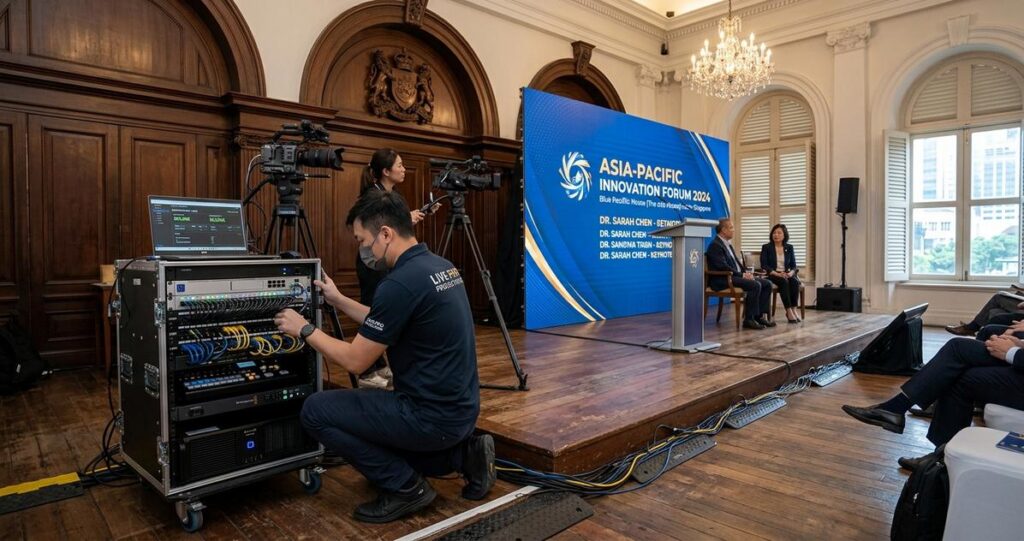
Older venues in Singapore carry a certain charm and practical value. They host product launches in heritage buildings, town hall meetings in community spaces, investor briefings in hotel ballrooms, and hybrid conferences in convention rooms that were not designed for today’s high-density streaming demands. The challenge appears when a modern event depends on reliable connectivity, yet the venue’s original cabling, radio environment, power layout, and internet access were built for very different use cases. For organisers, production teams, and business clients, connectivity problems can affect more than convenience. They can disrupt live streams, delay speaker coordination, weaken audience engagement, and create avoidable stress for everyone involved.
In Singapore, this issue matters because events often need to support both in-room and remote participation at the same time. A venue may look polished on the surface, but behind the walls it may still rely on legacy network infrastructure, limited fibre handoff points, or wireless coverage that struggles with thick walls and interference from surrounding equipment. The good news is that most connectivity challenges can be managed with proper planning, technical assessment, and realistic expectations. The key is to treat connectivity as a core production requirement, not an afterthought.
Why older venues create connectivity risk
Connectivity problems in older venues usually come from a combination of physical design, aged infrastructure, and modern bandwidth demands. Buildings constructed before hybrid events became routine were often not designed to support multiple live cameras, wireless presentation systems, remote interpreters, cloud-based collaboration tools, and audience devices all at once. Even when a venue has internet access, the available service may not be sufficient for stable high-quality live streaming or simultaneous conferencing.
Singapore’s built environment adds another layer of complexity. Many older venues are located in dense urban settings, where neighbouring Wi-Fi networks, reinforced concrete, metal structures, and basement spaces can affect signal propagation. That does not mean these venues cannot support professional event production. It means teams must understand the constraints before promising a seamless experience.
Legacy cabling and limited data points
Older venues may have network cabling that was installed for office use, basic guest access, or previous event formats. These setups may not provide enough hardwired data points for a production team that needs separate connections for streaming encoders, control laptops, intercom systems, and backup devices. When a venue depends heavily on Wi-Fi for critical workflows, reliability becomes harder to guarantee.
Hardwired Ethernet connections remain the preferred option for mission-critical event devices because they are generally more stable than wireless links. If the venue has insufficient patch points, long cable runs, or inaccessible network cupboards, production teams may need temporary cabling, managed switches, and a clear plan for network segregation.
Wireless congestion and signal interference
Wi-Fi performance can decline sharply in older venues, especially when many attendees connect their phones and laptops at the same time. In Singapore, this can be more pronounced in business events where participants expect constant connectivity for messaging, document sharing, and livestream access. Thick concrete walls, mirrored surfaces, stage lighting rigs, and surrounding radio activity can all affect signal quality.
Wireless congestion is not only about speed. It can also affect latency, which is the delay between sending and receiving data. For live production, latency can disrupt remote speaker coordination, audience polling, and confidence monitoring. Even brief drops in signal can cause streaming buffering, audio desynchronisation, or control system instability.
Power and network placement constraints
Older venues sometimes have limited flexibility in where equipment can be placed. Power outlets may be far from the stage, cable routes may be restricted for safety reasons, and network access may be concentrated in only one or two areas. These limitations can complicate camera placement, encoder positioning, and backup line deployment.
When power and network points are not positioned near the production workflow, teams may need to redesign the technical layout. That can mean using longer runs, additional distribution points, or compact rack-mounted systems that minimise footprint while preserving resilience.
Planning connectivity before event day
Good event connectivity starts long before the first guest arrives. The most reliable approach is to assess the venue early, compare actual technical needs against available infrastructure, and build redundancy into the plan. In Singapore, where event schedules are often tight and venue turnover can be fast, early site coordination is especially important. A brief walk-through is rarely enough for complex hybrid events. Teams should ask for technical drawings, network policies, and information about available internet handoffs, Wi-Fi coverage, and electrical distribution.
For business events, this planning stage should include both content requirements and technical requirements. A keynote with a single camera may be manageable on a modest connection, while a panel discussion with multiple remote speakers, live graphics, and audience interaction needs a more robust setup. The goal is to match the connectivity design to the event format, not assume that every venue will support the same configuration.
Conduct a realistic venue audit
A venue audit should identify where the internet enters the space, how many network ports are available, whether there is a dedicated line for production use, and how wireless access points are distributed. It should also confirm whether the venue shares bandwidth with public guest traffic or building operations. Shared connections can be adequate for simple use cases, but they can become unstable under load.
Teams should test from the exact areas where production equipment will sit, not only from the reception desk or a convenient corner of the room. Signal conditions can change drastically across a ballroom, theatre, or meeting suite. A useful audit also checks whether there are restrictions on third-party routers, network switches, or bonded cellular devices.
Clarify bandwidth needs early
Bandwidth is the amount of data a connection can carry over time. It is one part of the equation, but not the only one. Stability, latency, and packet loss matter just as much for live production. Packet loss refers to data that never arrives at its destination, which can cause glitches in audio, video, and remote control systems.
For a hybrid event, the production team should estimate the combined load from streaming, cloud conferencing, backup paths, presenter downloads, and staff access. If the venue cannot support those needs consistently, a dedicated internet line or an alternative connectivity plan may be required. In Singapore, many venues can coordinate temporary service options through telecom providers or managed event technology partners, but lead time matters.
Build redundancy into the plan
Redundancy means having a backup path if the primary connection fails. For critical corporate events, this may include a secondary wired line, a bonded cellular solution, or a separate network for production devices. Redundancy does not eliminate every risk, but it reduces the chance that one failure stops the event.
A practical setup often separates guest Wi-Fi from production traffic. This helps ensure that attendee usage does not affect the encoder, control room, or presenter systems. It also supports better troubleshooting because each network has a clearer purpose.
Technical strategies that improve reliability
Once the venue has been assessed, the technical design should focus on protecting audio, video, and control workflows. Connectivity is not just a streaming concern. It affects communication between production staff, remote contributors, and on-site presenters. A strong setup aims for predictable performance, simple fault isolation, and fast recovery if something changes during the event.
Experienced production teams often combine wired networking, managed wireless access, and contingency internet paths. This layered approach is especially useful in older venues where the building infrastructure cannot be fully controlled. The objective is not to make the venue behave like a purpose-built broadcast studio. It is to create a dependable working environment within the venue’s limits.
Use wired connections for critical equipment
Devices that directly influence the live output should generally use Ethernet whenever possible. This includes streaming encoders, main control computers, media servers, and some remote monitoring tools. Wired connections reduce the variability that comes with shared wireless access and help maintain more consistent throughput.
If the venue’s cabling is limited, a managed switch can extend connectivity to multiple devices from a single upstream port. However, the switch should be planned carefully, especially if quality of service, VLAN separation, or network access control is required. Those terms simply mean ways to prioritise important traffic and keep production systems separate from general-purpose traffic.
Segment production and public traffic
Network segmentation separates one group of devices from another so that guest devices do not interfere with core production systems. In a hybrid event, the production network may need to carry camera control, live switching, audio-over-IP, or cloud conferencing, while the public network handles attendee phones and laptops.
This separation is particularly useful in Singapore venues that host mixed audiences, such as corporate conferences with guest registration, press attendance, and internal staff devices. When traffic is separated properly, troubleshooting becomes easier and performance more predictable. If the venue cannot support advanced segmentation, a temporary event network may be the safer option.
Plan for cellular backup carefully
Mobile data can provide valuable backup connectivity, but it should not be treated as a guaranteed substitute for fixed internet. Cellular performance can fluctuate based on indoor signal conditions, building materials, carrier load, and location within the venue. In older buildings, a strong signal near a window may weaken significantly deeper inside the event space.
Where appropriate, teams can use bonded cellular systems that combine multiple mobile connections to improve resilience. These systems can be helpful for failover, but they still require testing in the exact venue. If possible, operators should confirm carrier performance from the room, not assume that reception on a phone equals usable bandwidth for streaming.
How to work with venue teams and service providers
Managing connectivity in older venues is rarely a one-party job. It usually requires coordination between the event organiser, venue operations staff, in-house IT teams, telecom providers, and external production partners. Clear communication is essential because technical assumptions can differ widely. A venue may say that internet is available, but that may not mean it is available in the form or location needed for live production.
In Singapore’s business and events sector, timely coordination can save substantial troubleshooting time on event day. The best outcomes usually come from sharing requirements early, confirming permissions for equipment placement, and documenting who is responsible for each connection. This reduces confusion when adjustments are needed quickly.
Ask the right technical questions
Useful questions include: Is the connection dedicated or shared? Where does the line terminate? Are there restrictions on routers or switches? What is the procedure if service degrades during the event? Are there known dead zones in the room? Can the venue provide direct access to technical support on the day?
These questions are practical, not excessive. They help identify whether the venue can support the event as planned or whether adjustments are needed. If the answers are unclear, request a pre-event test and, if possible, a full rehearsal with production equipment in place.
Document responsibilities clearly
When multiple parties are involved, ownership of each component should be written down. That includes the internet service, router configuration, switch management, Wi-Fi access, power allocation, and contingency procedures. Without this clarity, a connectivity issue can become difficult to resolve because everyone assumes someone else is responsible.
Documentation is especially valuable in heritage venues and multi-tenant properties where facility access may be controlled by different teams. A clean handover note can prevent delays at load-in and reduce stress during show time.
Event-day practices that reduce disruption
Even well-planned events can encounter surprises, so the final layer of protection is disciplined event-day operation. This means testing every connection before doors open, keeping critical devices visible to operators, and monitoring network health throughout the event. Small adjustments early in the day can prevent major disruptions later.
For Singapore organisations, punctuality and professionalism matter. When guests, clients, or partners are on site, there is little room for improvisation. A stable connectivity workflow supports not only the technical output but also the credibility of the host.
Test early and test under load
A quick internet speed check is not enough. Teams should test the actual streaming platform, remote conferencing tools, and backup paths using the real event configuration. If the event involves audience access, stress-testing with multiple devices can reveal whether the network remains stable under realistic conditions.
Testing should happen before the room fills up, because congestion often appears only when the venue is active. If problems arise, there is still time to change the access point location, switch to a wired option, or reassign devices to a different network.
Monitor key indicators during the show
Operators should watch for latency spikes, dropped frames, audio drift, and unstable network indicators. These warning signs can appear before a complete failure. When monitoring is active, the team can intervene early, for example by reducing stream resolution, shifting load, or moving noncritical devices off the production network.
Monitoring also helps teams understand venue behaviour over time. That information becomes valuable for future events in the same location, especially if the space is used repeatedly for corporate meetings, training sessions, or association events.
Keep the audience experience in mind
Connectivity planning should support the event experience, not just the technical checklist. If remote attendees need clean audio and stable video, the team should prioritise those elements over nonessential features. If in-room participants rely on digital presentations, presenters should have a local backup copy so that a momentary network issue does not interrupt the session.
In many older venues, a simple and resilient workflow performs better than an overcomplicated one. Clear priorities, fewer dependencies, and well-tested backup options usually deliver the best results.
Managing connectivity challenges in older Singaporean venues is ultimately about preparation, realism, and disciplined execution. The buildings themselves may have limitations, but those limitations do not have to define the event outcome. With early audits, careful network design, clear responsibility mapping, and practical backup planning, organisers can support stable hybrid experiences even in spaces that were never built for modern digital demands. For businesses, the value is straightforward: fewer disruptions, stronger audience confidence, and a smoother event from first speaker to final sign-off.
If a venue is known to have ageing infrastructure, treat connectivity as a critical production asset from the start. Confirm the network path, separate production traffic from public traffic where possible, test under real conditions, and keep backup options ready. For events with important stakeholders, the safest approach is to involve experienced technical partners early so that connectivity is designed into the production plan rather than repaired under pressure.
General information only: This article is intended to support event planning and technical awareness. For venue-specific assessments, internet provisioning, or critical production decisions, consult qualified event technology professionals and the relevant service providers.

Jeremy Lee is a seasoned digital marketing director and strategist with over two decades of experience in the industry. As the founder of Sotavento Medios, I manage a diverse portfolio of over 50 businesses, helping brands grow through advanced search strategies and digital innovation. My work focuses on bridging the gap between traditional search engine optimisation and the evolving world of AI-driven answer engines.
get in touch