
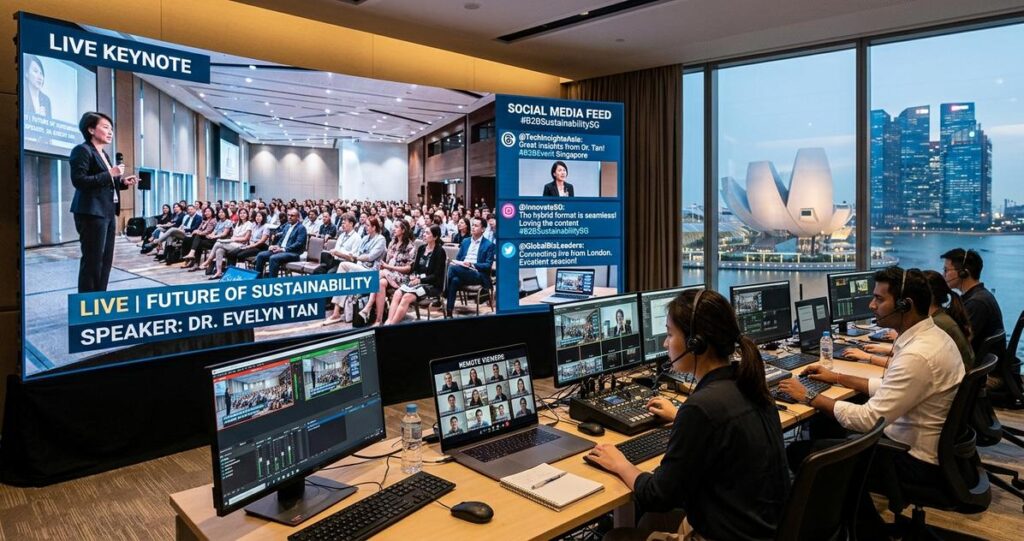
Hybrid events have become a practical format for many organisations in Singapore, from trade associations and professional bodies to corporate town halls, product launches, and training conferences. They combine an in-person audience with a remote audience, which means the event experience now extends beyond a ballroom, convention centre, or studio. A social media feed can strengthen that experience by making the stream feel more current, interactive, and community driven. When used well, it gives remote viewers a way to participate, helps on-site audiences see the wider conversation, and creates a record of audience engagement that can support post-event marketing. When used poorly, it can distract viewers, introduce moderation risks, or create avoidable compliance issues. For Singaporean organisers, the main concern is usually not whether social media can be integrated, but how to do it in a way that is reliable, professional, and appropriate for a business audience. That requires clear technical planning, moderation rules, and respect for privacy, platform policies, and the expectations of a diverse local audience.
Social media integration is no longer just a decorative feature. It can serve as a live layer of audience interaction, especially when the event agenda includes panels, product demonstrations, thought leadership talks, or community discussions. In Singapore, where hybrid attendance is often driven by busy schedules, regional teams, and international stakeholders, a well-managed feed can help bridge the gap between those physically present and those joining from home, office, or while travelling. The key is to treat the feed as part of the event design, not as an afterthought. That means deciding what content should appear, who approves it, how it is displayed, and how it aligns with the tone of the event itself.
Why social media feeds matter in a hybrid event stream
Hybrid events are built on one central promise, participants should feel included regardless of where they join from. Social media feeds support that goal by surfacing real-time reactions, questions, and commentary from attendees, speakers, sponsors, and even external viewers who are following the event online. This can increase perceived interactivity, because audiences can see that other people are actively responding. It can also make a broadcast feel more dynamic, especially during pauses in a programme, transitions between sessions, or Q and A segments.
For Singapore audiences, this can be especially useful in professional settings where audiences expect efficiency and relevance. A live feed can capture concise questions from LinkedIn, comments from Facebook, or event-specific posts using a branded hashtag. It can also help reinforce community around an event, which matters for associations, alumni networks, industry conferences, and government-related engagements. In practical terms, a feed can be used to highlight audience questions for moderators, display selected posts on-screen, or provide a social wall on a separate webpage for remote viewers. Each of these uses can support engagement, but only if the feed is curated and moderated carefully.
What a social feed adds beyond chat tools
Many event platforms already include chat, polling, or Q and A functions. Those features are useful because they are controlled within the event environment, but social media feeds add a broader public-facing layer. They can show how the event is being discussed outside the platform itself, which is valuable for branding and reach. For a sponsor, this can demonstrate visibility. For an organiser, it can show momentum. For a speaker, it can offer a wider sense of audience response.
That said, public social content should not replace controlled event interaction. Internal event tools remain better suited for structured Q and A, speaker follow-up, and moderated discussion. Social feeds work best as a complementary element, not the sole communication channel.
Planning the integration before the first post goes live
Successful integration starts long before the event begins. The first decision is which platform or platforms to include. In Singapore, the most suitable choice depends on the audience and the type of event. LinkedIn often fits B2B conferences, professional forums, and executive briefings. Facebook may be useful for broader community events. Instagram can support more visual campaigns, while X may be relevant for fast-paced public commentary. A good event team will not simply connect every platform available. It will select channels based on audience behaviour, moderation capacity, and brand fit.
The second decision is content scope. Will the feed show only posts with a branded hashtag, direct mentions of the event handle, or selected comments approved by a moderator? Will it display text only, or also images and short videos? Will it be visible to in-person attendees on a screen, to remote attendees in the stream interface, or both? The answer should depend on the event’s purpose and risk tolerance. Publicly visible social content should always be reviewed for relevance and tone before it is shown on a main stage screen or embedded in a live stream.
Define moderation rules early
Moderation is one of the most important parts of the process. If an organiser allows live social posts onto a screen without review, the feed may include spam, irrelevant comments, offensive material, promotional links, or content that does not align with the event’s objectives. For corporate and institutional events, that can damage credibility quickly. A safer approach is to use a moderation queue, where a trained team member approves posts before they appear.
Moderation rules should cover language, relevance, brand safety, and privacy. They should also define who has final approval during the event. In Singapore, where events may involve guests from different sectors, age groups, and cultural backgrounds, moderation also helps maintain inclusive communication. It is wise to brief staff on common escalation triggers, such as defamatory content, sensitive personal information, political commentary where inappropriate, or content that could expose confidential business details.
Check technical compatibility with the live stream
Social media feeds do not behave the same way across all streaming systems. The production team must confirm whether the event platform, encoder, or broadcast software can support third-party widgets, API-based integrations, or browser sources. Some feeds can be embedded directly into a virtual event platform. Others require custom overlays in production software. In studio or venue-based hybrid productions, the feed may be inserted as a graphic layer or shown on a dedicated audience screen.
Because live events have no second chance, compatibility testing matters. The production team should test the display resolution, font size, colour contrast, and motion behaviour of the feed well before go-live. A post that looks readable on a laptop may be too small on a projection screen. A feed that updates too quickly may distract viewers or clutter the programme. The final design should match the pacing of the event, not just the technical capability of the software.
How to display the feed without weakening the stream
Good social integration supports the event. Poor integration competes with it. The feed should never overpower the main speaker, the slides, or the product demonstration. In a hybrid event, the stream is still primarily a content delivery mechanism. Social content should enhance it by adding context, audience participation, or moments of emphasis. That balance is especially important when the event includes policy announcements, technical training, or financial information, where clarity matters more than visual novelty.
A common practice is to use the feed during transition periods, such as before the session begins, during breaks, or after a keynote. Another option is to reserve it for selected moments, such as live audience questions, speaker reactions, or sponsor mentions. If the feed is on-screen throughout the event, it should be placed in a way that does not obscure key visuals. For example, a side panel may work better than a bottom ticker if the stream already includes captions, speaker names, or slide content.
Design for readability and accessibility
Readability is not only a design issue, it is an accessibility issue. Text should be large enough to read on small devices, especially for remote viewers who may be watching on mobile phones. Colour contrast should remain strong enough for legibility. If the feed includes images or animated post previews, the production team should ensure that motion does not create visual overload. For audiences with different levels of digital fluency, simplicity is often better than visual complexity.
Accessibility also includes language choice. Singapore is a multilingual society, but many professional events use English as the main working language. If the event expects multilingual participation, the team should decide whether non-English comments will be translated, ignored, or handled in a separate channel. This should be planned early rather than improvised during the live show. Clear rules reduce confusion and help moderators make consistent decisions.
Use social content with purpose
Every item shown on the feed should serve a reason. It may answer a question, reinforce a theme, acknowledge a participant, or highlight a call to action. If the feed becomes a stream of random comments, it can weaken the event’s message. This is especially true for corporate audiences in Singapore, where expectations for professionalism are generally high. A disciplined selection process helps preserve authority while still creating a sense of live interaction.
Privacy, consent, and compliance considerations in Singapore
Any social media integration should be planned with privacy and legal compliance in mind. In Singapore, the Personal Data Protection Act, commonly referred to as the PDPA, governs the collection, use, and disclosure of personal data in many business contexts. While a social media post may already be public on the platform, embedding or displaying it during an event can still raise questions about context, consent, and audience expectations. Organisers should review whether the use of public posts fits the stated purpose of the event and whether attendees have been informed in advance.
If the event records speakers, delegates, or audience interactions, organisers should also consider whether consent notices are clear. This is particularly important when a social feed includes names, profile photos, or user handles. If posts are taken from a public platform and shown on an event screen, they may still reveal personal information that the original poster did not expect to be amplified in a corporate setting. A prudent approach is to use only content that is relevant, non-sensitive, and consistent with the event’s privacy notice and terms of participation.
Work with the platform terms and event policies
Social media platforms have their own rules about content usage, embedding, branding, and API access. These terms can change, and they may affect how content is displayed or stored. Event organisers should not assume that any public post can be reused without restriction in a live production. The production team should check the relevant platform policies and confirm whether the intended method of display is permitted.
In addition, the event should have clear internal policies for staff and moderators. Who can post on the official event accounts? Who can approve user-generated content? What happens if a post is deleted by its author during the event? What is the process for removing a post if it becomes inappropriate or inaccurate? These are practical questions, not theoretical ones. Answering them before the event reduces pressure on the production team in the middle of a live broadcast.
Operational best practices for Singapore-based hybrid events
Singapore events often involve tight schedules, high expectations for delivery, and attendees who value clear organisation. Social media feed integration should therefore be treated like any other live production element, with rehearsals, contingency planning, and staff allocation. The team should assign a dedicated moderator who monitors the feed continuously. This role is different from the technical operator. The moderator focuses on content quality, while the technician ensures the feed displays correctly.
It is also wise to create a backup plan. If the social feed fails, the event should continue smoothly without it. A hybrid event should never depend entirely on a third-party social connection to function. If the event is running in a venue with limited connectivity, the team should test internet stability, backup lines, and display failover options. If the feed is meant to support audience questions, the organiser should also retain a fallback route through built-in Q and A tools or a dedicated event email.
Examples of practical use in a Singapore setting
For a B2B conference at a downtown hotel, the organiser may display selected LinkedIn posts using the official event hashtag, especially during breaks between keynote sessions. For a medical or professional education seminar, the team may keep the feed off the main screen and instead use it on a side monitor for moderators, to avoid distracting from technical content. For a corporate town hall with regional staff joining remotely, the feed can be used to capture short messages of encouragement or questions from employees across different offices, provided moderation is in place.
These examples show that the right design depends on the event objective. A product launch may benefit from more visible social proof, while a policy briefing may require a quieter and more controlled interaction layer. The best approach is the one that supports the message and respects the audience.
Making the feed work after the event ends
The value of social integration does not end when the livestream stops. The content generated during the event can inform highlight reels, recap posts, internal reporting, and future programme planning. Engagement patterns may show which sessions attracted attention, which prompts drew the most response, and which topics encouraged discussion. That information can help organisers improve future hybrid events, even if it is used only in a qualitative way rather than as a formal metric report.
Post-event review should include both technical and editorial feedback. Did the feed display cleanly? Were the moderation rules sufficient? Did the audience understand what type of posts would appear? Did the selected content help the event or distract from it? Asking these questions allows the production team to refine the integration over time. For Singapore organisations that run recurring events, this process can improve consistency and reduce operational risk.
For organisers, the strongest approach is usually the simplest one, a feed that is curated, relevant, technically stable, and clearly aligned with the event’s purpose. Social media can add energy and visibility to a hybrid event, but it should always serve the audience experience first. When planning is done properly, the result is not just a more connected stream, but a more credible one.
Before your next hybrid event, review the chosen platform, moderation workflow, privacy notice, and technical integration points together. If your event involves public-facing discussion, sensitive information, or a large audience, it is wise to involve an experienced production partner early so the social layer supports the broadcast instead of complicating it.

Jeremy Lee is a seasoned digital marketing director and strategist with over two decades of experience in the industry. As the founder of Sotavento Medios, I manage a diverse portfolio of over 50 businesses, helping brands grow through advanced search strategies and digital innovation. My work focuses on bridging the gap between traditional search engine optimisation and the evolving world of AI-driven answer engines.
get in touch