
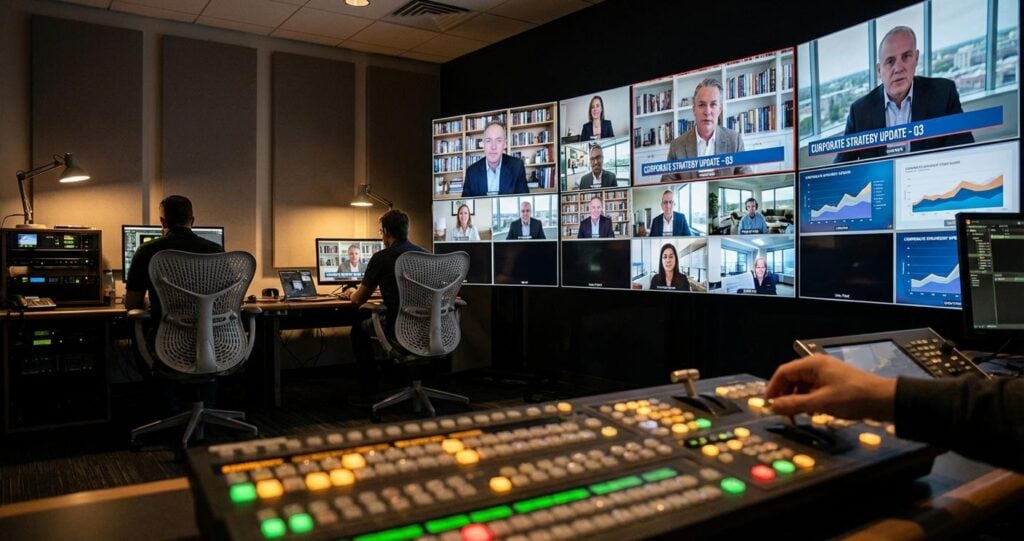
Foundational Infrastructure: Engineering a Resilient Digital Boardroom
The root of most virtual meeting distractions is an unstable foundation. For high-stakes executive communication, relying on consumer-grade internet connections and software defaults introduces unacceptable risk. A professional production approach begins with engineering a resilient and secure infrastructure designed specifically for real-time media transport. This is not an IT issue; it is a broadcast engineering challenge that requires dedicated resources and protocols.
Network Architecture and QoS Prioritization
The corporate network must be prepared to handle high-bitrate, low-latency video streams without packet loss. We recommend creating a dedicated VLAN (Virtual Local Area Network) for all production-related traffic. This segregates the video and audio streams from general office data traffic, preventing congestion and unpredictable latency spikes. On network switches, Quality of Service (QoS) policies must be implemented to prioritize real-time transport protocols. This involves configuring DiffServ Code Point (DSCP) values to mark packets from video encoders, NDI sources, and audio-over-IP (AoIP) systems like Dante as high-priority, ensuring they are processed first and are not dropped during periods of network congestion. A minimum of 1 Gbps connectivity is essential for the production environment, with a 10 Gbps backbone preferred for multi-source 4K workflows.
Redundancy and Failover Protocols
A single point of failure can derail an entire board meeting. Professional-grade redundancy starts with dual, diverse-path internet connections from different Internet Service Providers (ISPs). A network appliance configured for automatic failover ensures a seamless transition if the primary connection degrades or fails. For ultimate resilience, especially when the primary location’s connectivity is uncertain, bonded cellular technology from providers like LiveU or Teradek provides a robust backup. This technology aggregates bandwidth from multiple cellular carriers (e.g., AT&T, Verizon, T-Mobile) into a single, high-throughput connection. Power infrastructure is equally critical. All core equipment, including routers, switches, encoders, and production switchers, must be connected to uninterruptible power supplies (UPS) with sufficient runtime to survive a power outage. For mission-critical systems, specifying equipment with redundant power supply units (PSUs) is a non-negotiable standard.
Secure Contribution with SRT and RTMPS
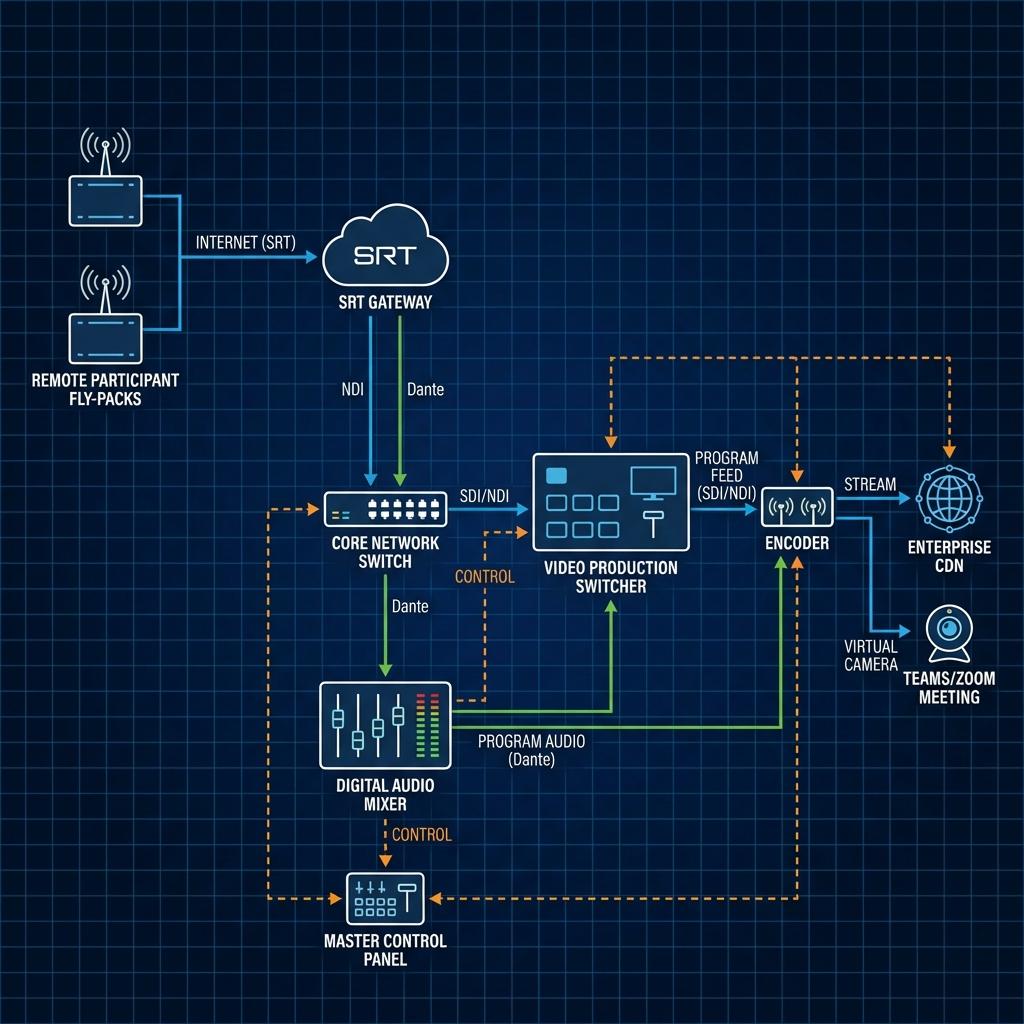
Getting high-quality, stable video and audio from remote executives into the central production is a primary challenge. Relying on the variable quality of a standard Teams or Zoom feed is not sufficient. The industry standard for this application is the Secure Reliable Transport (SRT) protocol. SRT is an open-source protocol that provides low-latency, encrypted video transport over unpredictable public networks. It excels at recovering from packet loss and navigating firewalls. We deploy a hardware or software SRT gateway at the main production facility to receive these incoming streams. Each remote participant contributes their feed via an SRT-enabled encoder, ensuring a secure, stable, and high-quality source. While RTMPS (Real-Time Messaging Protocol Secure) is still used for ingest into many platforms, SRT is superior for point-to-point contribution due to its lower latency and advanced error correction.
Mastering Signal Flow and Production Workflow
Once the infrastructure is solid, the focus shifts to managing the incoming audio and video signals with the precision of a live television broadcast. This centralized control is what separates a professional virtual event from a simple web conference. The goal is to create a seamless, polished program feed that is editorially controlled and technically flawless.
Centralized Video and Audio Management
All video sources, including local cameras and incoming SRT feeds from remote participants, should terminate at a central production switcher. Professional switchers like the Blackmagic ATEM Constellation or Ross Carbonite series allow a Technical Director (TD) to cut, mix, and transition between sources cleanly. Remote participant feeds, once received at the SRT gateway, are often converted to a baseband signal like SDI (Serial Digital Interface) or an IP format like NDI (Network Device Interface) for routing into the switcher. This allows every participant to be treated as a broadcast source, enabling the creation of dynamic multi-box views, picture-in-picture effects, and seamless transitions that are far superior to the automated switching in standard conferencing platforms.
Professional Audio Integration and Mix-Minus Feeds
Poor audio is the most common and jarring distraction in any virtual meeting. The solution is a dedicated audio engineer operating a digital audio console (e.g., a Yamaha QL or Allen & Heath Avantis). The most critical concept in this domain is the creation of a “mix-minus” feed for each remote participant. A mix-minus is a custom audio mix that includes the full program audio (everyone else speaking) *minus* the participant’s own voice. Sending this custom feed back to each remote participant completely eliminates the echo and feedback loops that plague conference calls when someone’s microphone picks up their own voice from their speakers. This requires sophisticated audio routing, often using AoIP protocols like Dante, to create and manage dozens of independent mixes simultaneously.
ISO Recording and Multiview Monitoring
For archival, compliance, and review purposes, it is essential to record more than just the final program output. A professional workflow includes isolated (ISO) recording of every single video source, including each remote participant and any presentation materials. This provides maximum flexibility for post-event editing or clarification. The entire production is managed from a control station equipped with a multiview monitor. This monitor displays all video sources, a preview bus (what will be live next), the program bus (what is currently live), and audio level meters on a single screen. This gives the TD complete situational awareness and the ability to anticipate and react to any potential issues before they become distractions for the board members.
Optimizing the Remote Participant Environment
You can have the world’s best production studio, but if the source quality from a remote CEO is poor, the entire presentation is compromised. The only way to guarantee quality is to control the technology at the remote location. Leaving this to chance on the executive’s home office setup is a recipe for failure.
Standardized Remote Kits: The “Fly-Pack” Approach
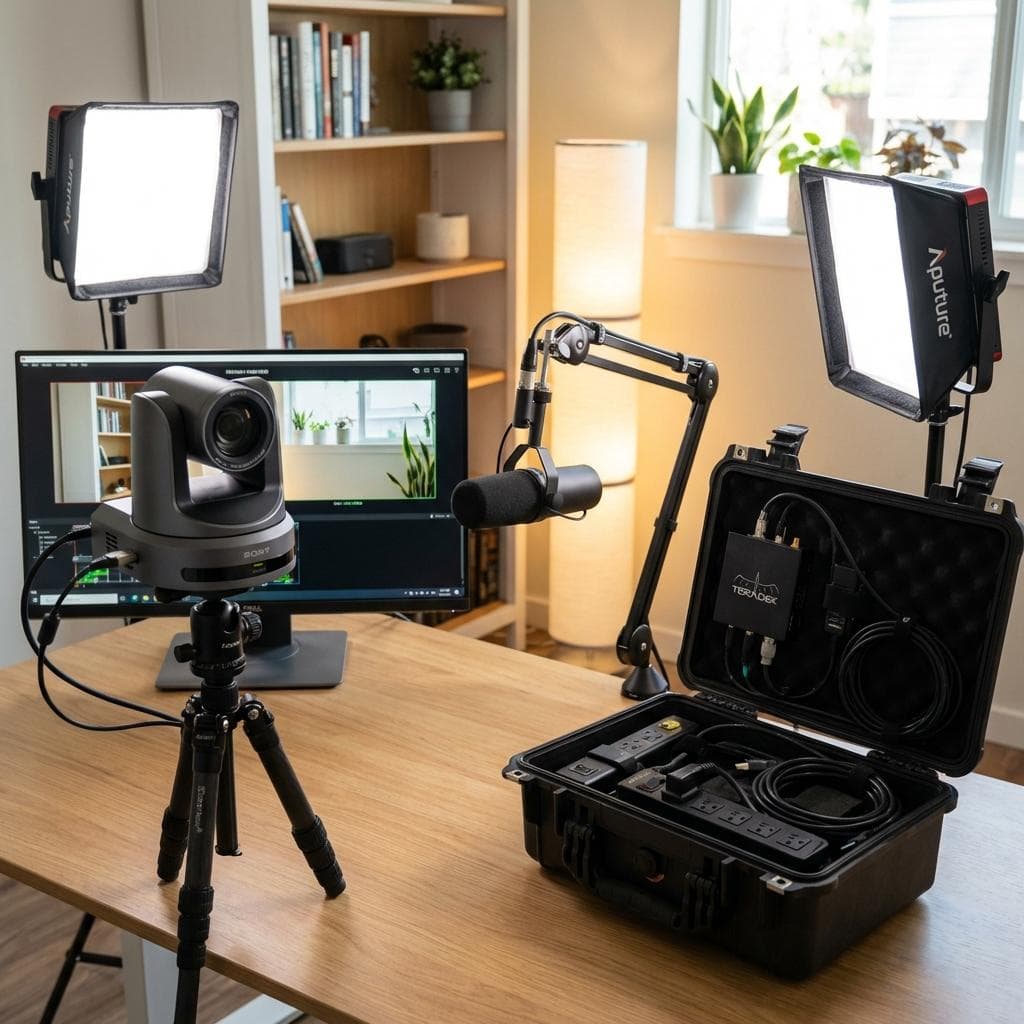
To ensure consistency and quality, we advocate for deploying standardized remote production kits, or “fly-packs,” to all key participants. These are not simple webcam and headset packages. A professional fly-pack includes a broadcast-quality PTZ (Pan-Tilt-Zoom) camera with SDI or NDI output, enabling remote control of camera shots. Audio is captured with a professional microphone, such as a Shure SM7B or a high-quality lavalier, connected to a USB audio interface. Critically, the kit includes professional lighting, typically two small LED panels, to create a three-point lighting setup that properly illuminates the subject and separates them from the background. The entire package is connected to a pre-configured hardware encoder or a small form-factor PC that is set up for one-touch SRT streaming back to the main studio.
Guided Setup and Remote Production Control
The fly-pack is delivered with a clear setup guide, but the service does not stop there. A remote production engineer from our team establishes a session with the executive’s assistant to manage the equipment remotely. Using secure remote access tools, our engineer can control all critical aspects of the feed. This includes PTZ camera operation (pan, tilt, zoom, focus), camera shading (adjusting color balance, iris, and gain to match other participants), setting correct audio levels on the microphone interface, and monitoring the SRT stream’s performance. This proactive, white-glove service removes the entire technical burden from the executive, allowing them to focus solely on the meeting’s content.
Integrating with Enterprise Platforms for a Hybrid Approach
This professional production workflow does not have to exist in a vacuum. It can powerfully augment enterprise platforms like Microsoft Teams, Zoom, or Webex, especially in hybrid scenarios with both in-person and remote board members. Individual remote participants can be brought into the production switcher using the platform’s NDI output features. The fully produced, broadcast-quality program feed from the switcher, complete with lower-third graphics, multi-box views, and balanced audio, is then sent *back into* the Teams or Zoom meeting. This is accomplished using a hardware output from the switcher connected to a capture device, which appears as a high-end “virtual webcam” in the conferencing application. This allows attendees who are simply viewing via the standard platform to see the polished, professional output, not a chaotic gallery view.
Advanced Production Techniques for Absolute Focus
With the foundations of infrastructure, signal flow, and remote source quality addressed, the final layer involves applying broadcast techniques to enhance clarity and maintain engagement, ensuring the technology is a transparent medium for communication, not a distraction itself.
Dynamic Graphics and Data Visualization
Replacing clunky “screen sharing” with professional graphic overlays is a significant step. Using broadcast graphics systems like Singular.live or Ross XPression, a dedicated graphics operator can cleanly integrate speaker titles, agenda items, and key data points as lower-thirds or full-screen graphics. This ensures that visual information is presented with clarity and corporate branding, perfectly integrated into the video frame rather than competing with it. This method also avoids the common pitfalls of screen sharing, such as showing unintended notifications, messy desktops, or incorrect aspect ratios.
The Virtual Green Room and Communication Systems
A seamless start is crucial. We establish a “virtual green room,” which is a separate video conference or audio channel managed by a production coordinator. All participants join this call 30 minutes before the official start time. Here, our engineers perform final checks on their audio, video, and lighting, and the director can provide private briefings. During the live meeting, professional communication is maintained through a dedicated comms system. The director uses a talkback system to give instructions to the technical crew, and an IFB (Interruptible Foldback) system allows the director or a producer to speak discreetly into an earpiece worn by a presenter or moderator, without being heard by other participants. This allows for real-time guidance and cues, tightening the presentation and preventing awkward pauses or miscommunication.
Ultimately, minimizing distractions in a high-level virtual board meeting is an exercise in broadcast production discipline. By moving beyond the limitations of simple conferencing software and adopting a workflow built on resilient infrastructure, centralized control, and professional signal management, we transform a potentially chaotic online meeting into a focused, secure, and effective executive communication platform. It is a fundamental shift from relying on technology to actively directing it.
Written by Spring Forest Studio Technical Team

Jeremy Lee is a seasoned digital marketing director and strategist with over two decades of experience in the industry. As the founder of Sotavento Medios, I manage a diverse portfolio of over 50 businesses, helping brands grow through advanced search strategies and digital innovation. My work focuses on bridging the gap between traditional search engine optimisation and the evolving world of AI-driven answer engines.
get in touch