
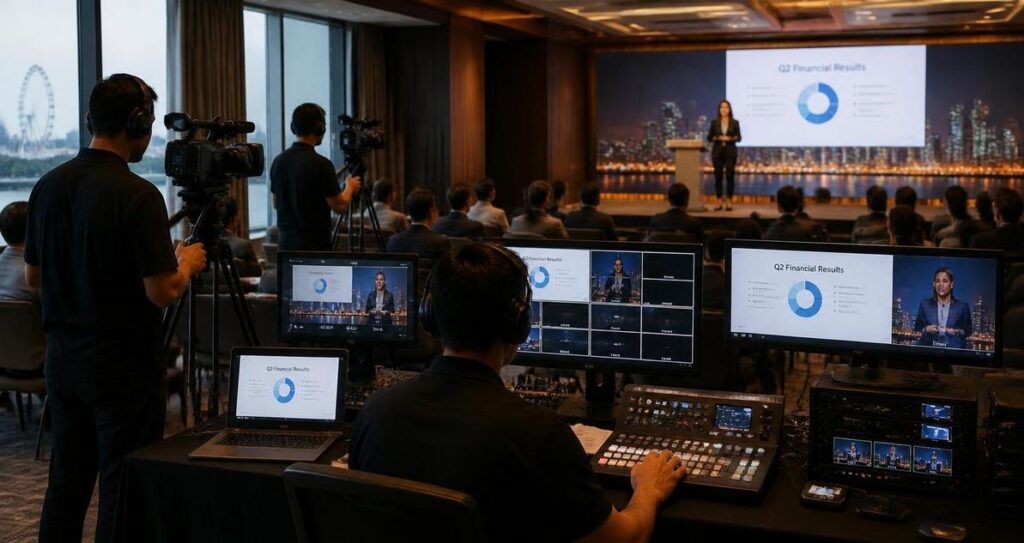
A successful B2B corporate stream is not just about getting the video live. For Singapore companies, it is often a high-stakes communication channel used for product launches, internal town halls, investor briefings, training sessions, webinars, or client-facing thought leadership events. When the stream fails, the damage is rarely limited to a frozen screen or poor audio. It can affect credibility, interrupt sales conversations, weaken employee engagement, and reduce the value of months of planning. The good news is that most streaming problems are preventable with a disciplined checklist that covers content, technical readiness, audience experience, and contingency planning.
In Singapore, where audiences are used to efficient digital experiences and where teams often work across office, home, and regional markets, corporate streaming needs to be treated as a production discipline, not a casual add-on. A polished stream reflects on the organisation’s professionalism, while a disorganised one can signal poor preparation. This checklist is designed to help marketing teams, communications leads, HR departments, and event organisers build a reliable workflow for the next B2B corporate stream, whether it is hosted from a meeting room in Raffles Place, a hotel ballroom in Marina Bay, or a hybrid studio setup in the city fringe.
Start With the Purpose, Audience, and Success Criteria
Before any camera is tested or slide deck is finalised, the team must define what the stream is meant to achieve. A B2B stream can serve very different purposes, and each purpose changes the format, tone, and technical setup. A product announcement may need a crisp presenter-led structure with strong visuals, while a training session may require longer Q&A, screen-sharing, and clearer segment transitions. If the objective is not clear, the event can become too long, too generic, or too technical for the intended audience.
For Singapore audiences, it also helps to consider practical viewing behaviour. Many professionals will watch from the office during lunch, between meetings, or on mobile devices while commuting. Some may be joining from regional offices in different time zones. That means your content must be concise, accessible, and easy to follow even if the sound quality is not perfect on the viewer’s end. It also means the registration page, reminder emails, and stream instructions should be simple and direct.
Define the audience segment clearly
Not every B2B audience has the same expectations. A stream for procurement managers should not sound the same as one for C-suite decision-makers, technical engineers, or channel partners. Identify the viewer group, their likely knowledge level, and the action you want them to take after the event. That action could be booking a demo, downloading a white paper, joining a follow-up workshop, or simply remembering your organisation as a reliable partner.
It is also wise to separate internal and external audiences. Internal corporate streams, such as leadership updates or compliance briefings, usually need tighter message control and may require stricter access permissions. External streams often need stronger production value and more careful branding because they are part of your market-facing reputation.
Set measurable event goals
Success criteria should be agreed before production begins. These may include live attendance, average watch time, audience interaction, click-throughs to a landing page, or post-event meeting requests. While not every stream needs a complex analytics framework, it should have at least a few defined outcomes so the team can review performance meaningfully. Without this, the stream becomes an isolated broadcast rather than a business asset.
Build the Content and Run-of-Show Around Clarity
Many corporate streams fail because the content is overloaded. A speaker may have too many slides, too much jargon, or too little time to explain key points. A well-structured run-of-show, which is the minute-by-minute production plan for the event, keeps the session focused and makes it easier for presenters, moderators, and technical crew to stay aligned. In a hybrid setting, clarity matters even more because the online viewer has fewer cues than someone in the room.
Good stream content should guide the audience through a logical progression. Start with the reason the session matters, move into the core message, support it with examples or demonstrations, and end with a clear next step. This may sound simple, but it is often where many corporate events become diluted. The best streams are not necessarily the longest ones. They are the ones that respect the audience’s time and attention.
Keep the narrative structure disciplined
Every segment should have a purpose. Opening remarks should orient the audience. Product demonstrations should show value quickly. Panel discussions should be moderated to prevent repetition. Q&A should be curated so the most relevant questions are answered first. If the event includes multiple speakers, their roles should be defined clearly in advance so there is no confusion about who covers which topic.
In Singapore, where business audiences are often efficient and detail-oriented, a concise structure usually performs better than a meandering one. If a topic is complex, break it into smaller parts and explain each part with plain language. Define any technical term the first time it appears. For example, latency means the delay between the source and the viewer receiving the live feed, while bitrate refers to the amount of video data transmitted per second. Clear definitions reduce friction and help the audience stay engaged.
Prepare presenter materials early
Slides, speaker notes, demo scripts, and visual assets should be completed well ahead of the stream. Last-minute changes increase the risk of mismatched cues, missing graphics, and rushed transitions. Presenters should also rehearse with the final deck, not a draft version, because timing often changes once actual slides are used. If there is a moderator, that person should know where to insert transitions, when to introduce speakers, and how to manage audience questions without disrupting the flow.
For hybrid and virtual B2B events, slides should be designed with the screen in mind. Dense text and small fonts are hard to read on laptops and mobile phones. Use large typography, minimal clutter, and strong visual hierarchy. If charts or tables are used, make sure they are legible without requiring the viewer to zoom in.
Test the Technical Setup Like a Production System
Technical reliability is the backbone of any corporate stream. Even a well-written agenda can collapse if the internet connection is unstable, the audio is distorted, or the encoder is misconfigured. A proper technical check should happen more than once, ideally during a full rehearsal that mirrors the actual event environment. This includes testing the camera angle, lighting, microphones, internet connection, streaming platform, screen-sharing workflow, and backup options.
In Singapore, venue connectivity may appear strong on paper, but network performance can still vary depending on room location, building infrastructure, and bandwidth sharing. That is why a production team should never assume that a single internet line is enough without testing it under load. For mission-critical corporate streams, a backup internet route such as a separate wired line or a mobile hotspot can be a useful contingency. This does not eliminate risk entirely, but it can reduce the likelihood of a full outage.
Check audio first, then video
Audiences are usually more forgiving of imperfect visuals than of bad audio. If the sound is echoey, too quiet, distorted, or full of background noise, people disengage quickly. Use appropriate microphones for the room and the format. A lapel microphone can work well for a single presenter, while handheld or table microphones may be more suitable for panel discussions. If the room is large or acoustically difficult, additional sound treatment may be necessary.
Video quality also matters, but it should support communication rather than distract from it. Ensure the camera is positioned at eye level where possible, the background is uncluttered, and the lighting is even. Avoid strong backlighting from windows, which is common in offices with glass walls. If there are slides and speaker shots, rehearse the switch between them to avoid awkward transitions or black screens.
Use a full rehearsal, not a casual dry run
A rehearsal should include the same sequence used during the live stream. That means opening graphics, speaker handoffs, slide transitions, audience engagement prompts, and emergency fallback procedures. Everyone involved should know what happens if the presenter loses the clicker, if a slide fails to load, or if the moderator needs to extend the Q&A session. A structured rehearsal also helps identify timing issues that are not obvious on paper.
For a hybrid corporate stream in Singapore, rehearsal should also account for the physical venue, including check-in flow, presenter holding areas, camera sightlines, and any on-site access restrictions. If guests are attending in person, their movement should not interfere with the stream’s visual or audio environment. These small details can make a significant difference to overall professionalism.
Protect the Audience Experience Before, During, and After the Stream
A corporate stream does not begin at the first live frame. It starts when the audience receives the invitation, sees the registration page, and decides whether to commit time to the event. The same applies after the stream ends, because follow-up communication shapes whether the effort turns into useful business results. When the entire audience journey is managed carefully, the stream feels coherent and trustworthy.
Singapore-based viewers are often practical and time-conscious, so simple logistics matter. Make sure the session title is clear, the start time is correct, and the access instructions are easy to follow. If the audience is expected to join from multiple regions, state the time zone explicitly. If the event includes a password or platform login, share it securely and well in advance.
Improve attendance with clean communication
Registration confirmation emails should include the agenda, date, time, platform, and technical requirements in plain language. Reminder messages should be sent at sensible intervals without becoming intrusive. If the session is for a specific business audience, such as channel partners or enterprise clients, the messaging should reflect their interests rather than a generic corporate template.
During the stream, keep transitions smooth. Long silences, unexplained pauses, and unstructured speaker changes make the event feel uncertain. A dedicated moderator can help maintain momentum, manage live chat, and guide attendees through the experience. If questions are taken live, establish rules so the session remains relevant and does not drift off topic.
Plan for accessibility and inclusivity
A professional stream should be usable by as many viewers as possible. Captions can improve accessibility for people who are hard of hearing, are watching in noisy environments, or prefer to follow along visually. Clear speech, readable slides, and good colour contrast also help. If the event includes multilingual elements, plan the translation or interpretation workflow carefully so the message remains accurate.
Accessibility is not only about compliance or courtesy. It improves comprehension for all viewers. In a business context, that translates into better retention of information and fewer misunderstandings. For Singapore audiences, where teams may be linguistically diverse, this can be especially valuable.
Prepare a Contingency Plan and Review Performance Properly
Even with excellent planning, live production can still encounter unexpected issues. A speaker may arrive late, a laptop may fail, the network may dip, or the stream platform may behave unpredictably. The difference between a minor interruption and a serious failure is usually the strength of the contingency plan. Every B2B stream should have a backup structure that the team can activate quickly without panic.
This means assigning roles clearly. Who speaks if the host is delayed? Who troubleshoots the audio? Who decides whether to pause, switch to pre-recorded content, or continue with a reduced setup? In a high-pressure environment, role clarity reduces mistakes. It also supports calmer communication with the audience if something does go wrong.
Create backup paths for the most important risks
The most common backup needs include an alternate internet connection, a spare laptop, replacement cables, backup microphones, and a pre-rendered version of key content. For important launches or executive briefings, having a contingency opening video or holding slide can prevent dead air if a speaker is delayed. A secondary platform access method can also be useful if the primary link becomes unstable.
The goal is not to eliminate every possible risk, which is unrealistic. The goal is to reduce avoidable failure points and ensure the event can continue in a controlled way. This approach is especially useful for corporate streams with senior stakeholders, external clients, or regional teams who may have limited tolerance for disruption.
Review the stream against the original objectives
After the event, review not only technical performance but also communication effectiveness. Did the audience understand the key message? Did the event stay within time? Were questions handled well? Did the stream support the intended business outcome? Use platform analytics, internal debriefs, and audience feedback to identify what worked and what needs improvement.
In Singapore’s business environment, post-event discipline matters because teams often need to move from one campaign or briefing to the next quickly. A structured debrief allows the organisation to build a stronger process over time. Keep notes on what caused delays, which rehearsal items were missed, and which production choices improved engagement. Over several events, this creates a more dependable in-house capability or a clearer brief for your external production partner.
If the stream involves product claims, financial information, or regulated content, ensure the relevant internal review processes were followed before publication and that the content remains aligned with company policy. General information in a corporate stream should not be treated as legal, financial, or medical advice unless it has been reviewed and approved by the appropriate professional.
Mastering a B2B corporate stream is less about dramatic production tricks and more about disciplined preparation. When purpose, content, technology, audience experience, and contingency planning are aligned, the result is a stream that feels smooth, credible, and worth the audience’s time. For Singapore organisations that need to communicate clearly and professionally, this final checklist is not optional housekeeping, it is the foundation of a reliable digital event strategy. Treat each stream as a repeatable process, refine it after every event, and the quality of your next broadcast will improve in visible, measurable ways.

Jeremy Lee is a seasoned digital marketing director and strategist with over two decades of experience in the industry. As the founder of Sotavento Medios, I manage a diverse portfolio of over 50 businesses, helping brands grow through advanced search strategies and digital innovation. My work focuses on bridging the gap between traditional search engine optimisation and the evolving world of AI-driven answer engines.
get in touch