
The Technical Blueprint for Pacing: Integrating Bumpers and Stings into Enterprise Streaming
In the domain of B2B event streaming, maintaining audience engagement throughout multi-hour broadcasts like corporate all-hands meetings, product launches, or financial analyst briefings is a primary technical challenge. The cognitive load on a remote audience is substantial, and without structured pacing, viewer attention rapidly decays. While content is king, the technical execution of its delivery dictates its impact. This is where production assets like bumper videos and stings transition from creative afterthoughts to critical infrastructural components. They serve as programmatic punctuation, enabling seamless transitions, reinforcing brand identity, and providing crucial moments for audiences and production crews to reset. However, their effective implementation is not a simple drag-and-drop operation. It demands a robust technical workflow, from media ingest and preparation to signal routing and synchronized playout, that guarantees flawless, broadcast-quality execution. This article provides a detailed technical analysis of the infrastructure, protocols, and best practices required to integrate these assets into high-stakes corporate streaming and hybrid event productions.
Asset Integrity: The Foundation of Broadcast-Quality Playout
The reliability of any live production is only as strong as its weakest link, and frequently, that vulnerability lies in improperly prepared media assets. A video file optimized for social media will invariably fail in a professional broadcast environment, causing dropped frames, color shifts, or catastrophic playback failure. Ensuring asset integrity begins with stringent adherence to broadcast standards during pre-production and media management.
Codec, Container, and Bitrate Specifications for Flawless Playback
The choice of video codec is paramount. Consumer-grade codecs like H.264 or H.265 in an MP4 container are designed for efficient delivery over the internet, utilizing inter-frame compression that requires significant CPU or GPU resources to decode in real-time. This is unsuitable for a live production switcher or media server that requires instant, frame-accurate access. For this reason, professional productions rely on intra-frame codecs. We recommend standardizing on one of the following:
- Apple ProRes 422 HQ: A widely supported, high-quality intermediate codec that offers an excellent balance between file size and visual fidelity. A 1080p60 ProRes 422 HQ file typically has a bitrate around 220 Mbps, which is easily handled by modern playback systems.
- Avid DNxHD/DNxHR: Similar to ProRes, DNxHD (for HD) and DNxHR (for high resolution) are robust, industry-standard codecs common in post-production workflows. They ensure that what was edited is precisely what gets played out on screen.
These codecs should be wrapped in either a QuickTime .MOV container or a Material Exchange Format .MXF container, with MXF being the preferred choice for many broadcast systems due to its richer metadata capabilities. Audio must be uncompressed PCM at 48kHz, 24-bit resolution to avoid any quality loss or transcoding artifacts. It is also critical to normalize audio levels to a broadcast standard like EBU R 128 (-23 LUFS) to prevent jarring volume jumps between live presenters and pre-produced content.
Color Space and Audio Channel Management
A common point of failure is mismatched color information. All graphic assets must be produced in the same color space as the live camera sources. For high-definition productions, this is Rec. 709. For 4K/UHD productions, it may be Rec. 709 or Rec. 2020 for High Dynamic Range (HDR) workflows. A mismatch, such as playing a Rec. 709 bumper in a Rec. 2020 program, results in visibly undersaturated, washed-out colors. Furthermore, audio channel mapping must be deliberate. A standard stereo configuration should have program audio on channels 1 and 2. For multilingual events, additional language tracks can be embedded on subsequent channels, allowing the audio engineer to route the appropriate language to the corresponding stream encoder.
Integrating Playout Systems into the Live Production Signal Flow
Once assets are properly encoded, they must be integrated into the core production infrastructure. This involves dedicated playout systems and a clear understanding of signal transport protocols, whether they are traditional baseband video or modern IP-based methods. The goal is to make the bumper or sting available as a source on the main production switcher, just like a camera, so it can be seamlessly cut or mixed into the program feed.
On-Premise Playout: SDI and Broadcast Media Servers
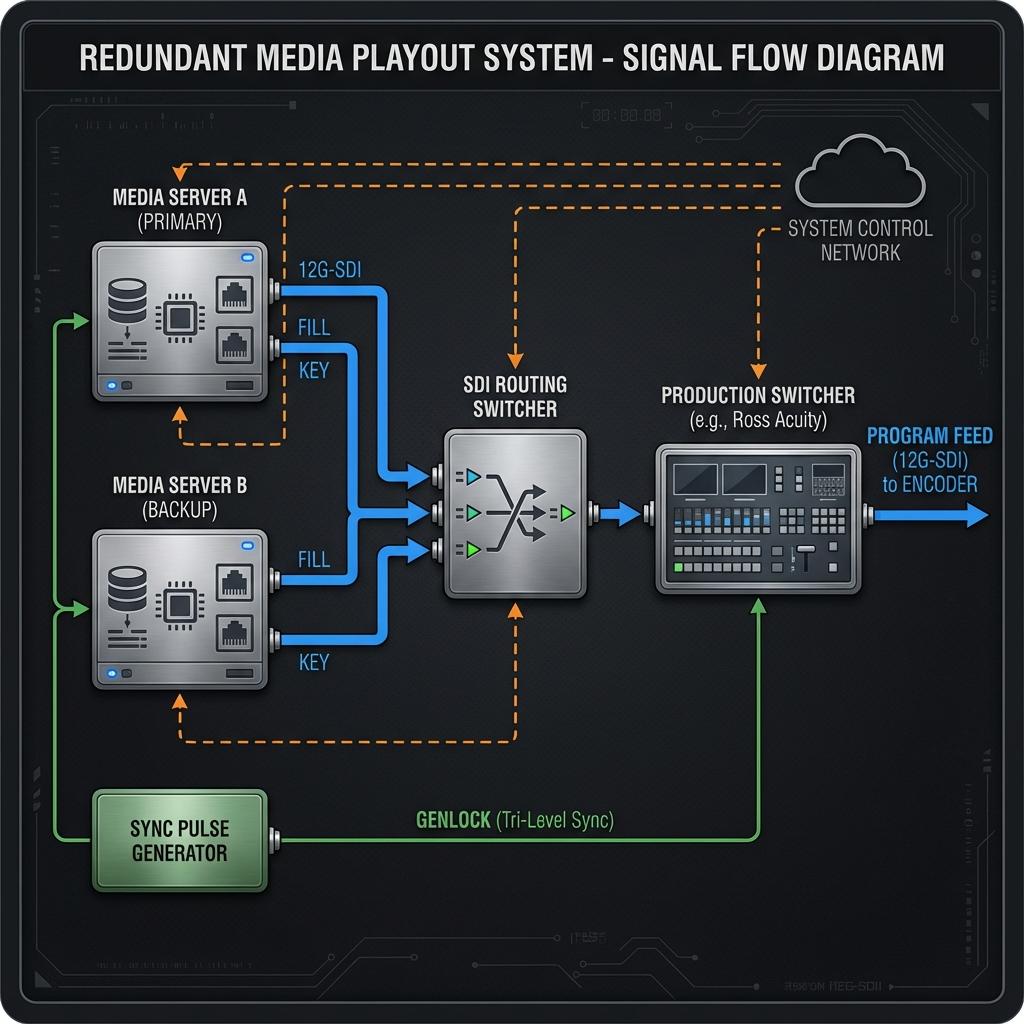
For maximum reliability and zero-latency playback, dedicated broadcast media servers are the industry standard. Systems from manufacturers like Ross Video (XPression and Tria), EVS, and Grass Valley are engineered for this specific task. The primary method of connection is via the Serial Digital Interface (SDI), a robust coaxial connection that carries uncompressed video, embedded audio, and timecode. For HD workflows, 3G-SDI is sufficient. For 4K/UHD at 60 frames per second, a 12G-SDI connection is required. Many professional graphics systems provide two SDI outputs for a single asset: a key signal (alpha channel) and a fill signal (the color video). This allows the bumper to be composited as a layer over other video sources, enabling sophisticated transition effects. These servers are typically controlled from the production switcher using protocols like VDCP (Video Disk Control Protocol) or AMP (Advanced Media Protocol), allowing the technical director to cue and play assets with the press of a single button.
Software-Based Playout and IP-Based Workflows with NDI and SRT
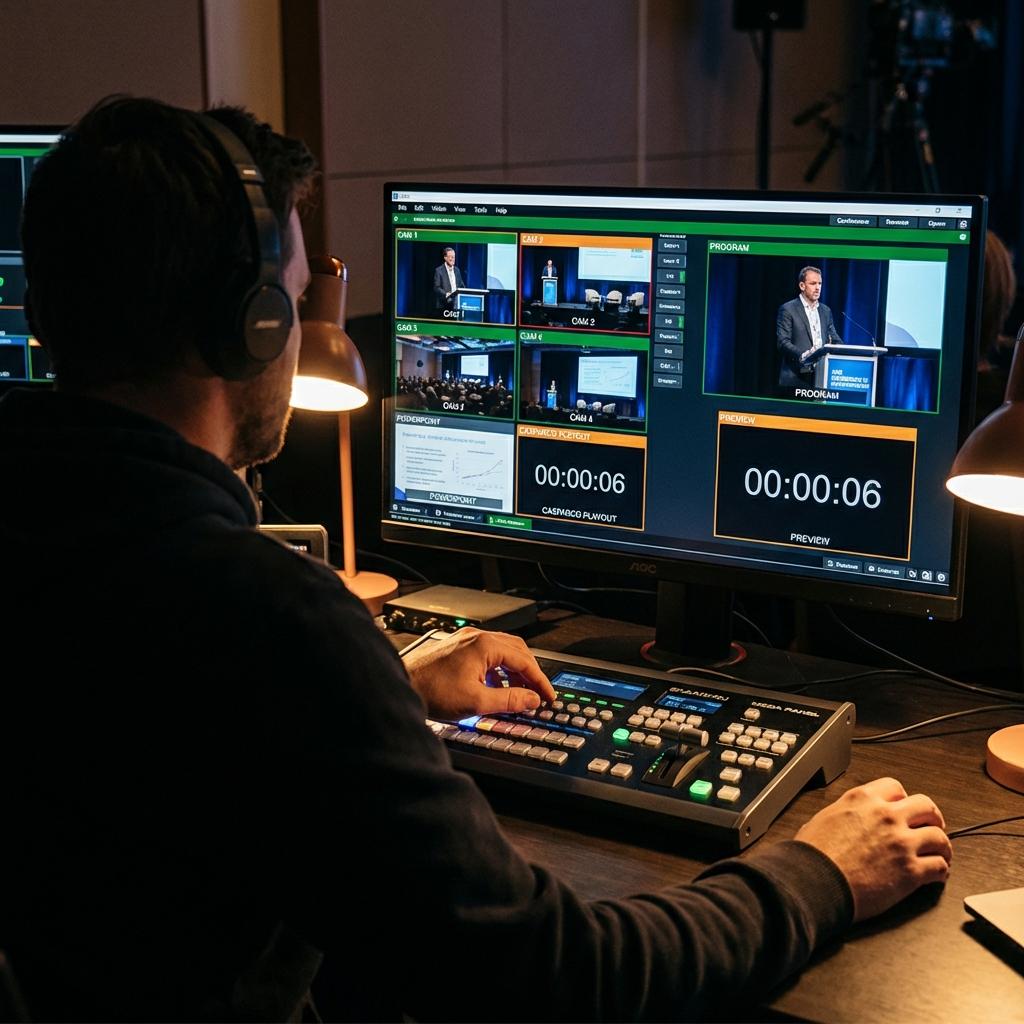
Software-based solutions running on high-performance workstations offer a more flexible and cost-effective alternative. Applications like vMix, CasparCG, and Mitti can serve as powerful media players. In these setups, signal transport shifts from SDI to IP protocols. The leading protocol for local area networks is NDI (Network Device Interface). NDI can carry a high-quality, low-latency video signal over a standard 1GbE or 10GbE network, allowing the playback machine to become a discoverable source for any NDI-aware switcher on the same network. Building a reliable NDI playback system requires specific hardware: a modern multi-core CPU, a powerful NVIDIA GPU for encoding and decoding (NVENC/NVDEC), fast NVMe SSD storage to handle high-bitrate media, and a 10GbE network interface card to ensure sufficient bandwidth. While NDI is excellent for on-site production, Secure Reliable Transport (SRT) can be used to send a playback feed from a remote location over the public internet, providing a secure, stable signal for distributed productions.
Synchronization, Genlock, and Timecode for Frame-Accurate Switching
In any multi-source production, all video signals must be synchronized to prevent glitches, tearing, or black frames during switches. This is achieved using genlock, where a master Sync Pulse Generator (SPG) sends a reference signal (traditionally called black burst or tri-level sync) to all cameras, playback servers, and the production switcher. This ensures every piece of equipment is operating on the exact same clock cycle. In addition to genlock, Linear Timecode (LTC) or Vertical Interval Timecode (VITC) can be used to ensure frame-accurate triggering of events. For a hybrid event, maintaining this level of synchronization is critical to ensuring the experience for the in-room audience on IMAG screens is identical to the one for the remote streaming audience.
Advanced Automation and Redundancy for High-Stakes Events
For complex corporate events with numerous transitions and media cues, manual operation introduces the risk of human error. Advanced automation and robust failover strategies are not luxuries; they are essential for executing a flawless broadcast that reflects enterprise-level professionalism.
Automating Triggers with Production Switcher Macros
Modern production switchers from brands like Ross, Grass Valley, or Blackmagic Design feature powerful macro capabilities. A macro is a pre-programmed sequence of actions executed with a single button press. A typical “Play Bumper” macro might be programmed to perform the following sequence:
- Begin a 1-second fade of the main program audio.
- Take the audio from the media server channel (Audio-Follow-Video).
- Execute a dissolve transition from the live camera source to the media server source.
- Send a command via VDCP or AMP to the media server to play the selected bumper video.
- At the end of the video, automatically transition back to the designated live camera.
This level of automation simplifies the technical director’s job and guarantees consistent, perfectly timed transitions every time. Further integration using tools like Bitfocus Companion can link these macros to external devices like Elgato Stream Decks or even a presenter’s slide advancer.
Designing Redundancy and Failover Architectures
For any mission-critical broadcast, a single point of failure is unacceptable. A professional bumper playout system must be redundant. The standard approach is an A/B configuration. Two identical media servers are configured, loaded with the exact same media, and synchronized. The primary server (A) is fed into the production switcher, while the backup server (B) runs in parallel. Both servers can be controlled by a primary and backup production switcher. In the event of a failure on server A, a routing switcher can instantly repatch server B’s output to the switcher input with no disruption to the program feed. The media itself should be stored on a redundant storage system, such as a RAID 5 or RAID 6 array, to protect against individual hard drive failures. For IP workflows, this means having redundant network switches, bonded network interface cards on the playback machine, and redundant power supplies for all critical components.
Conclusion: Elevating Production Value Through Technical Excellence
Effectively using bumper videos and stings in a corporate stream is a direct reflection of a production’s technical maturity. It demonstrates a deep understanding of broadcast engineering principles, from codec science and color management to signal flow architecture and automation. These assets are far more than simple video files; they are precisely engineered components integrated into a larger, more complex system. By investing in the proper infrastructure, standardizing asset preparation, and implementing robust automation and redundancy, enterprise clients can transform their live and hybrid events from simple webcasts into highly professional, engaging, and flawlessly paced broadcasts. At Spring Forest Studio, our technical teams specialize in designing and deploying these sophisticated workflows, ensuring that every element of your production operates at the highest level of quality and reliability.

Jeremy Lee is a seasoned digital marketing director and strategist with over two decades of experience in the industry. As the founder of Sotavento Medios, I manage a diverse portfolio of over 50 businesses, helping brands grow through advanced search strategies and digital innovation. My work focuses on bridging the gap between traditional search engine optimisation and the evolving world of AI-driven answer engines.
get in touch